Skip Navigation

Blender

Members
0
Posts
44
Created
3 yr. ago

A community for users of the awesome, open source, free, animation, modeling, procedural generating, sculpting, texturing, compositing, and rendering software; Blender.

Rules:

  1. Be nice
  2. Constructive Criticism only
  3. If a render is photo realistic, please provide a wireframe or clay render

🌉 bridged from !blender@lemmy.world by Tidepool

RopeGN: Geometry Nodes group for simulating ropes

Blender doesn't provide a built-in simulation capabilities for 1D objects such as ropes. One could fake that with a narrow-mesh cloth simulation, but the result is not good enough. RopeGN implements the XPBD algorithm (also used in Blender's cloth simulation) with some tweaks and sauces specific to 1D manifolds which makes it more effective, accurate and much faster. Here's the master repository from which you can download this node group, and where I'll be adding more stuff in the future: https://github.com/haykh/GeometryNodes Post the cool stuff you've done with this in the comments : ) PS. Also, I'm not really distributing this through any other channels, since most markets request for payment info even for free assets. So if you like this and can -- please spread the word! PPS. There are some example simulations which I couldn't attach to this post in the README of the subdirectory: https://github.com/haykh/GeometryNodes/tree/master/RopeGN image

Extensions

The Blender Extensions Platform will soon support asset libraries

devtalk.blender.org
Experimental

Gaussian splatting rendering in Blender 5.3 alpha

youtu.be

Gaussian splatting rendering technique landed in Blender main branch after many months of hard work as of 2026/09/17 It is not guaranteed to be in 5.3, since the code is still work in progress and things may change after public scrutiny and found bugs, but it looks promising and on track, if things go well to be in 5.3 This makes rendering spatial point cloud data better, since the splats make the points look more solid and continuous. It currently works for PLY and SPZ file formats. Work and discussion: https://projects.blender.org/blender/blender/issues/159470

youtu.be

What's the use of freestyle when Line art exists?

Its customizable, but convoluted and janky. Line art seems like its successor.

My problems with freestyle:

• no real time preview • the flags for what to outline are janky. • cant include or exclude specific objects • cant exclude certain lines from being drawn.

Line art doesnt have most of these problems except the last issue. I dont know how to remove specific lines from being drawn, all I can do is add more lines.

Small teams, ambitious projects

Where do we want Blender's development to focus over the next two years? Read Small Teams, Ambitious Projects article by Dalai Felinto. Summary of strategic targets: • Dynamic Overrides • Animation tools • A more complete rigging system and UI tools • VSE Story tools: Board to Previs • Collaborative asset creation in teams Potential goals: • Blender adoption by game studios • Blender adoption in large scale animation and VFX • Blender in mechanical industry Original post (Mastodon): https://mastodon.social/@Blender/117286789309168149

code.blender.org

Help with terms to find tutorial to "wrap" mesh around another mesh

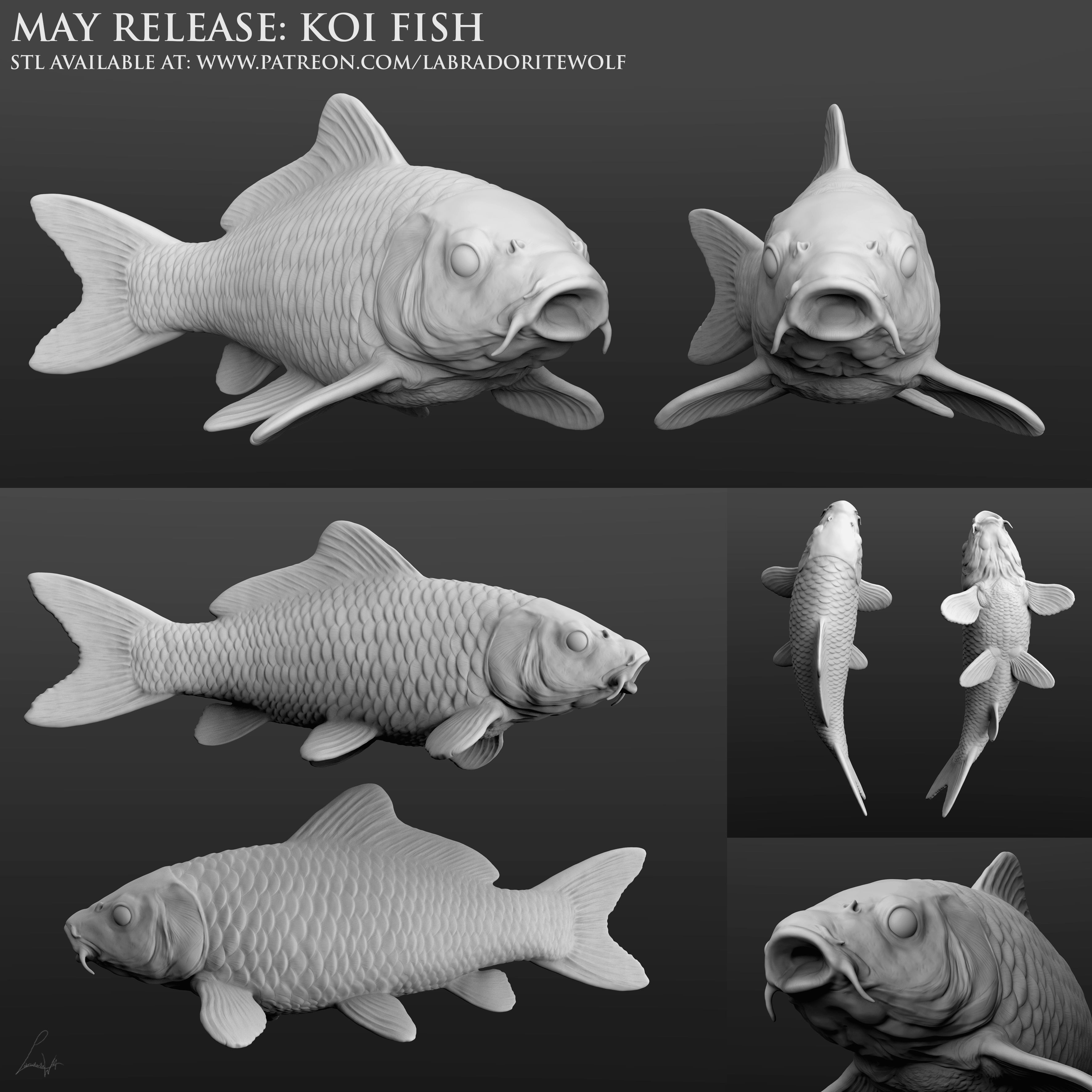
Hi y'all, I just need someone to tell me what this process is called. Or direct me to some tutorials that would teach me. I'm not asking anyone to fully explain the process. I'm sure it's not simple. I'm self taught. And mostly use blender for 3d modeling for 3d printing. Im always trying to challenge myself to learn new techniques/processes in blender. I've been using blender about 2 years and still feel I barely know the tools or which would be useful to me. I generally approach learning blender : "I have an idea, how do I do it?" So I'm learning blender in a haphazard way. I found starting with beginner-tutorial series to not be very helpful (I started with the donut one) because they were aimed at making digital assets and scenes. Animations. Coloring. I'm designing for 3d printing. And my art background has made me a decent sculptor so I use that tool the most. That and Boolean. Although I appreciate starting with full tutorial series, please do not suggest this. I already went through many beginner videos and they really just aren't taylores for 3d printing applications. I need my models to have high resolution (decently high) geometry for printing. Not just "looking like" they have texture but the mesh actually needs to have that texture topography. Which brings me to my point. here is an example of what I'm trying to learn to do. Let's say I sculpt an egg. But it's not perfect. So it's not symmetrical. Just an egg-like shape. With a decent size amount of triangles. So we have smooth tapered ends. And lots of curves. And It's a closed mesh shape. Solid. Okay. Now let's say I want to cover it in scales. These scales need to run in a specific direction. Let's say like a dragon egg. So vertical. But they need to wrap around the egg shape horizontally and I want them to condense near the top and bottom of the egg. Where it tapers. Remember my example is not symmetrical. So maybe the egg top is off centered a little compared to the bottom. Or maybe it curves off to the side and droops a bit. (The point is it has uneven bulbus curves. And it's not symmetrical in any way). Now if I make a disc shape for a single scale , I can manually place it and use shrink wrap but it only works on one axis so it looks weird. It doesn't curve around the egg shape like a real scale would. Even so that's one scale. If I were to cover the whole thing it would take forever. But this approach doesn't work anyway. But also. By using a scale I made, I can sculpt this scale to have a little flare and be more aesthetic than a basic circle disk. So it would be optimal to use a sculpted mesh I made rather than something else. Like a displacement filter image So I could use a lattice tool. Apply a black and white displacement picture of a scale pattern over it. But we have the same problem. It won't wrap evenly. It only applies on one axis and where the scales should wrap around, they get distorted weird instead of continuing around the egg shape. Plus using a displacement photo isn't as aesthetic as using a scale I sculpted. I can also use an array to make a ton of the scales in a band. Then I could copy these over and over and move each copy up to make a stack of scales. A hollow cylinder of the scale pattern. And trying to shrink wrap it or something doesn't work since it's just going to shrink on one axis. So making a round cylinder of the scale pattern is not useful. So that's not going to work either. Now Ive looked into UV wraps. But that appears to be for "coloring" and "fake textures". By this I mean the topography is not changed. It only 'looks" like it has. Great for games or digital scenes. Not great for 3d printing. Also I am confused by how uv wraps work as it doesn't seem like you can make them for sculpted objects. ? And how do you get the pattern to match up anyway ? And they use displacement filter instead. Which is not what I want. I want actual mesh changes. Wrap a mesh around another mesh. So anyway. Ive seen plenty of 3d print models I'm certain have done what I've given an example of. And yet I can't figure out how this is done. I've spent a lot of time trying multiple approaches with the ways I listed. And I've watched a ton of videos but none allow for this full texture application that isn't fixed on one axis. Here is an example of a fish model that illustrates what I'm talking about. Make uniform scales and apply them to a sculpted fish body. https://img-new.cgtrader.com/items/4078195/88d9e6f6b7/koi-fish-3d-model-88d9e6f6b7.jpg Being able to wrap models around models at all axis would be incredibly useful for me. I have a lot of design ideas that I can't make because they require this. What's it called ? What tutorials do I need ?