About
Post-modern community focused on post-modern editor.
Rules
Instance rules apply here.
🌉 bridged from !helix@programming.dev by Tidepool

Post-modern community focused on post-modern editor.
Instance rules apply here.
🌉 bridged from !helix@programming.dev by Tidepool
Remove the background from a theme
Very quickly
• Create the ~/.config/helix/themes directory.
• Create your custom theme; in my case, ayu_nb.toml.
• In it, inherit from the theme you’re currently using. And add the "ui.background" = {}
toml
inherits = "ayu_dark"
"ui.background" = {}
• Edit your ~/.config/helix/config.toml to use your theme.
toml
theme = "ayu_nb"

[...]
With these steps, you go from this
image
to this
image
note: ptyxis terminal with Ayu theme
Release 25.07 Highlights
A post-modern modal text editor.
Release 24.07 · helix-editor/helix
Came out a few days ago, but I thought it was worth posting here =)

Launching Helix with default theme in tmux causes unexpected change in colors
solution by @wada@lemmy.ml
Hi,
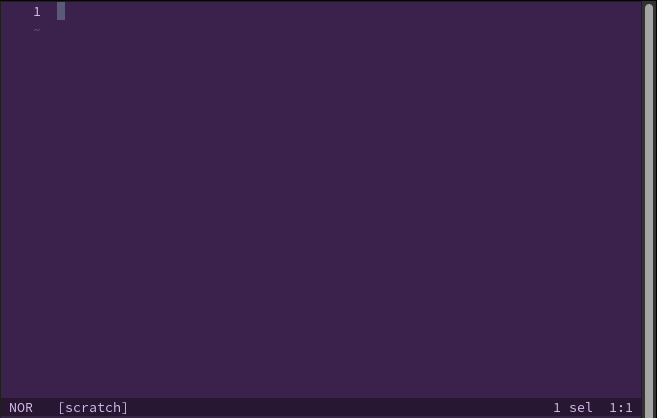
I'm new to both using Helix and terminal multiplexers in general, so I'd appreciate some help with this. When I launch Helix without tmux, I see the default theme with a purple background, which I like:
image
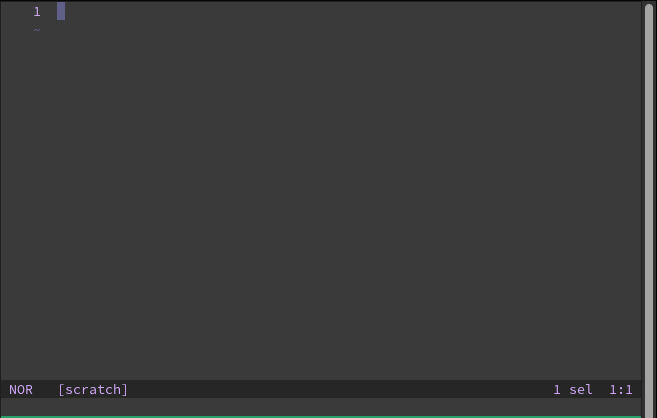
But when I launch it using tmux, even with the -2 flag, Helix does not display the same color scheme:
image
I have tried making a config.toml file with an [editor] section and set true-color to true, but that didn't appear to help. How can I use the default theme with tmux? I'm using GNOME 47 with wayland on Fedora, in case that matters.
Any post I've seen involving Helix, tmux & colors seem to be with custom themes, so I don't know which threads are relevant to this, if any.___
Is there a shortcut doing open_below → normal_mode → paste_before?
or should I create my binding in the keymap?
Helix 24.03
Mostly internal changes this time
How to make current filename show up as the window/console title? (Konsole being my terminal emulator)
When I'm editing with helix, I often have multiple instances of it running, one for each file, in different terminals (more precisely: in different tabs of my terminal emulator, Konsole). Currently, the title of these tabs reads just "Directoryname: helix". It would be really helpful if the titles included the current filename, so that I could see which tab has which file opened. Is there a way to do this?
How to open the parent directory relative to the current buffer
To open a file relative to the current one in Helix, you can to the do the following with 24.3:
:o <C-r>%<C-w>
Here, the Control-R allows you to select a register and the special register "%" contains the current file path and inserts into the command line, while the final Control-w chops off the last part of the file name leaving with you current directory.
This is like :o %:h from Vim/Neovim
Helix has just transitioned to Nucleo for fuzzy matching
Nucleo is a project from creators of helix and is significantly faster that alternatives like fzf.
If you want to use latest features, such as this one, check out helix-git AUR package. (if you are using arch btw)

What are your top tips for new Helix users?
I've started using Helix occasionally as I stumbled across the editor when trying to customize vim for Rust.
Immediately, I fell in love with how (mostly) plug and play Helix is.
Over the next few months, I plan to use Helix more and more. If you have any useful tips on usage, customization or anything else I am all ears.
New Helix release! 23.10
New helix version was released 12 minutes ago with new features: • multiple language servers • fuzzy matching with nucleo (nucleo is a project from creators of helix and is significantly faster than alternatives like fzf) • smart tab • better registers • initial support for LSP DidChangeWatchedFiles • syntax highlight regex prompts
 View on programming.dev