homelab
🌉 bridged from !homelab@lemmy.world by Tidepool

homelab
🌉 bridged from !homelab@lemmy.world by Tidepool
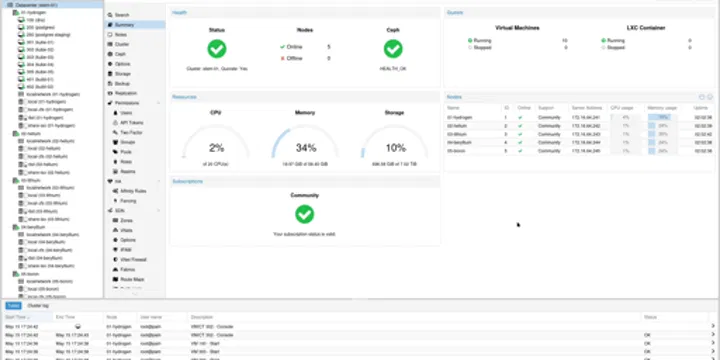
Hypervisor, VM, LXC and Docker: A Simple Guide
I wrote a short, no-nonsense breakdown of the different virtualisation layers for my blog. I get asked about this a lot by people moving over to Proxmox, so I figured I’d share it here in case it’s useful for anyone else starting out.

old laptop and raspberry pi is my past - what should be the upgrade?
cross-posted from: https://feddit.org/post/23170671
I need to keep power usage in mind and don't want to spend more than 500€ on hardware. Power is roughly 0.35ct/kwh in Germany I like the small square machines (former NUC). But I don't have any overview which ones are worth the price. For data storage I am thinking about a NAS, but it would need at least two HDDs for redundancy, otherwise it's not better than an external HDD that I have. Also it does have its own power draw, which isn't insignificant (10w->~300€/10years). Capabilities of the machine don't matter too much, I will see what I can do with the hardware I get. Is there a sweet spot, a device that everyone buys or cheapest brand or best package or whatever?
Options for SMB shares without a single point of failure.
Why I'm dabbling in this is a very long story, but lets assume I only have 2 servers at my disposal and want Windows Server VMs providing SMB shares without a single point of failure. Proxmox and HyperV are my options for hypervisors.
Ceph is out for a few reasons, most notably only having 2 servers, 1Gb networking and the Windows Server VM would still be a single point of failure. I've been reading up on Windows Storage Spaces and if I'm understanding correctly it seems I could cluster 2 physical or virtual servers, replicate the data between the 2 and present the SMB share as the cluster name/IP rather than individual servers.
Before I spend too much time setting up Windows clusters, are there any other options I should be looking into?
Traefik setup routing rules help
Hello friends, I've been pulling my hair out trying to figure out how to get my service to properly play well with traefik. My service is reachable at /dnd-notes/page, but the service needs to fetch additional resources and fails to do so. IE: user navigates to /dnd-notes/foobar foobar loads. foobar fetches /.client/main.css foobar fails to find this resource. Here is my static configuration:
## traefik-static.yml
providers:
  docker:
    exposedByDefault: false

api:
  insecure: true
  dashboard: true

entryPoints:
  web:
    address: :80
  websecure:
    address: :443

log:
  level: DEBUG
Here is my compose:
services:
  traefik:
    image: "traefik:latest"
    container_name: "traefik"
    ports:
      - "80:80"
      - "8080:8080"
    volumes:
      - "/var/run/docker.sock:/var/run/docker.sock:ro"
      - "./traefik/traefik.yaml:/etc/traefik/traefik.yaml"

  silverbullet:
    image: zefhemel/silverbullet
    container_name: "dnd-notes"
    volumes:
      - './dnd-notes/space:/space'
    labels:
      - "traefik.enable=true"
      - "traefik.http.routers.dndnotes.rule=PathPrefix(`/dnd-notes/`)"
      - "traefik.http.routers.dndnotes.service=dndnotes"
      - "traefik.http.routers.dndnotes.entrypoints=web"
      - "traefik.http.routers.dndnotes.middlewares=dndnotes_stripprefix"
      - "traefik.http.services.dndnotes.loadbalancer.server.port=3000"
- "traefik.http.middlewares.dndnotes_stripprefix.stripprefix.prefixes=/dnd-notes"SC/APC SFP to bypass provider ONT
My Internet provider just installed me a 2,5Gbps fiber connection. It arrives with a single fiber connected to a GPON ONT (ZTE ZXHN F6005) connected with an RJ45 cable to the 2,5Gbps port of a 5530 Fritz!Box router. I'd like to bypass both the router and the ONT, do you think that it's possible? For the router my provider says that it's possible and it provided me the connection parameters, but for the ONT I've no idea. I would need a singe fiber SC/APC 2,5Gbps SFP+ adapter that I cant seem to find. Can anybody help me? 'm based in Europe.
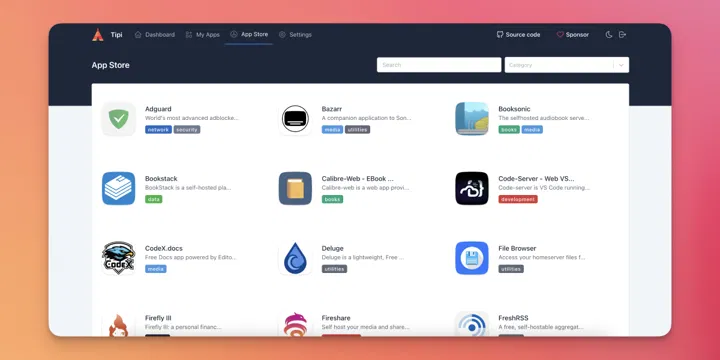
Runtipi: Homeserver management made easy
cross-posted from: https://programming.dev/post/1429257
It has an 'App store' that's been growing a lot lately. Writing new docker-compose.yaml files is easy (see: https://www.runtipi.io/docs/contributing/adding-a-new-app ), and exposing them behind NAT, e.g. from home it's easy too (see: https://www.runtipi.io/docs/guides/expose-apps-with-cloudflare-tunnels )... But my favorite perk is the folder structure (see: https://www.runtipi.io/docs/reference/folder-structure ), and the fact that 'media' is shared between apps.
Recently updated my Network Diagram, Its still a work in progress
I added some more unifi APs, a Raspberry Pi4 for a low power unifi controller, and I replaced the MOCA bridges with multiple Cat6 runs letting me power most of the wifi from the generator in the basement across the house.
I should probably do a full write up of what it all is and why, and I plan to get optimum and Verizon working together so I can leverage both internet connections in the whole house.
 imgur.com
What to do with inherited server?
Hey everyone. So I just inherited a Dell R720 from work. I don’t know the full specs on it yet, but it’s got a 24 core processor and about 380 GB of memory. I need to buy my own drives, though. I honestly have no idea what to do with this. I’ve dreamed of having a home lab, but only ever thought about hosting a Unifi controller and a plex or jellyfin server. I’ll probably put Proxmox on it to manage everything. What recommendations do you all have for making use of this server? I’m honestly open to anything!
Cloning your hard drive, the easy way (with Clonezilla)
Does anyone read descriptions anymore? If you read the description, comment with "That's a bossy video". Shoot, is that engagement farming? Oh well. What? Oh, right, I'm supposed to be describing this video. It's about Clonezilla! I love using Clonezilla for backing up my disk drives to images. It's also helped me out to be able to convert a physical machine to a VM easily. It's such a simple tool and I'm really thankful to the folks who made it. You can check out the tool at https://clonezilla.org. Also, I wrote a companion blog post for this video: https://vkc.sh/clonezilla-101 And if you like the shirt I'm wearing, I sell it over on my merch store: https://vkc.sh/product-tag/test-your-backups/ Lastly, I couldn't do this without the supporters I have on Patreon and Ko-Fi, who foot the bill for all of this nonsense. If you want to join our Discord-slash-Matrix, tiers start at $2/mo USD. Thank you! https://patreon.com/VeronicaExplains https://ko-fi.com/VeronicaExplains Chapters: 0:00 I say "greetings" and tell you about Clonezilla 3:26 What do you need to start using Clonezilla? 4:57 What I'm using to demonstrate Clonezilla 5:45 Getting started and choosing a Clonezilla mode 8:10 Cloning a device to an image with Clonezilla 12:18 Restoring a Clonezilla image to a new device 15:00 It even works with encryption!
Pinepods - Self hosted podcast management system
For the last 6 months or so I've been working on Pinepods. I have never been able to find the perfect self-hosted podcast app that I wanted to use. podgrab's player is rather lackluster and misses a lot of features that I would like. With Pinepods you can play, download, and keep track of podcasts you enjoy. It allows for searching new podcasts using The Podcast Index or Itunes and provides a modern looking UI to browse through shows and episodes. In addition, Pinepods provides simple user managment and can be used by multiple users at once using a browser or app version. Everything is saved into a Mysql database including user settings, podcasts and episodes. It's fully self-hosted, and I provide an option to use a hosted API or you can also get one from the podcast API and use your own. There's even many different themes to choose from! Everything is fully dockerized and I provide a simple guide found below explaining how to install Pinepods on your own system. It’s also super easy to import podcasts from any app using OPML files. There's also lots of modern features like MFA, self-service password resets, and some Podcast 2.0 functionality (more to come) In addition to all that, I've built a client version of the app that can connect via API to your home server over something like a reverse proxy or tailscale. Pinepods just had is on version 0.3.1 with all the basic functionality implemented. Currently, you're likely to experience issues, but I certainly invite pull requests or opening issues if you have the time. You can also get setup assistance on the discord server. I invite you to try it out! Check out the official site here: https://www.pinepods.online/ Github here: https://github.com/madeofpendletonwool/PinePods Discord Server: https://discord.gg/bKzHRa4GNc

InSpectre: Open,Zero-cloud network visibility, security and container management
Hi all I built InSpectre (https://inspectre.cc/), an open-source, self-hosted platform designed to discover, track, fingerprint, and security-scan every device on a local network without relying on third-party cloud services. As a homelab administrator and sysadmin, I wanted a single dashboard to keep track of active LAN devices, catch vulnerabilities before they become problems, track household presence, and manage container infrastructure without sending telemetry outside my local network.
Key features:
Device Discovery and Fingerprinting: Uses active ARP sweeps combined with a passive ARP/DHCP sniffer to spot new devices immediately. It auto-classifies devices using OUI, DHCP parameters, and port patterns.

Security and Vulnerability Scanning: Integrates Nuclei and nmap (-sV) for scheduled CVE scanning per device with a severity-grouped dashboard.

Traffic Control and Blocking: Allows you to pause network access or set recurring block schedules per device via ARP MITM.

Presence Tracking: Groups multiple devices (phone, laptop, smartwatch) under individual people to provide a unified Home/Away status and per-person schedule controls.

Docker and Proxmox Monitoring: Streams logs, scans images with Trivy for CVEs, and manages container updates with automated rollbacks.

Integrations: Native Home Assistant MQTT auto-discovery, 16 notification channels (ntfy, Gotify, Telegram, Pushover, Discord, etc.), and custom JSON/YAML plugins.
Architecture: The app runs as four lightweight Docker containers (frontend, backend, probe, and Postgres). By default, zero bytes leave your LAN unless you explicitly configure an external notification integration. It is dual-licensed under AGPL-3.0 and Commercial. Project repository: https://github.com/thefunkygibbon/InSpectre I would love to hear your feedback on the architecture, features, or performance. What tools do you currently use for LAN visibility, and what features would make this more useful in your setup?
What do you have cookin?
Surprised to see less activity here. Having assumed everyone using FOSS, was hosting FOSS, I just peeked in here and only saw two posts lifetime. (Maybe that's a visibility issue for me?) Anyhoo: What are you all working on? I'll go: I'm a noob trying to figure out why my mf Minecraft vm's network permissions want to destroy me!
Released: CyberTools Admin 1.5.0 — Backup/Restore Automation for CyberPanel & Linux Servers
Hi everyone,
I built a CLI tool to bring reliable, enterprise-grade backup automation to CyberPanel and Linux servers.
CyberTools Admin 1.5.0 includes:
• Automated project & system backups • Safe Restore (restores into a test directory first) • Direct Restore with confirmation • Auto-Healing Startup (.bashrc fix) • Unified logging • Zero telemetry • Pure Bash
More details + install guide: theusaseo[dot]com/cybertoolsadmin/
Would love feedback from the self-hosting and Linux communities.

 View on lemmy.world