A community for discussion and posts relating to pico-8
Wormhole
🌉 bridged from !pico8@programming.dev by Tidepool

A community for discussion and posts relating to pico-8
🌉 bridged from !pico8@programming.dev by Tidepool
Reindeer Revolt - A little Christmas game
My first pico 8 game. A little late for Christmas but... there you go! Hope you like it
Developer @Picasso@thelemmy.club

HELP! i cannot manage to install pico 8
hi! i bought a MIYOO MINI V4 to play pico 8 games
i've followed these instructions:
Drag the app folder from the releases page into /mnt/SDCARD/App/ (so it becomes /mnt/SDCARD/App/pico). Warning: If you use FTP and Filezilla, you must set your transfer type to binary or it will corrupt binaries on transfer.
Drag your RASPBERRY PI pico8_dyn and pico8.dat into /mnt/SDCARD/App/pico/bin (If the directory doesn't exist, you can create it). You can purchase Pico-8 here.
and i cannot manage to see pico 8 in the apps menu as the tutorials say.
also instead of all the apps they show i only see 4. instead of multiple apps as in the tutorial i followed
https://www.youtube.com/watch?v=VnkJmobkc6o&t=12s
i dont understand.. please help!
Picotron 0.1 released!
First version of a new fantasy console/computer from Lexaloffle is available to purchase now, on sale till the end of the month. I haven't tried it yet (other than limited messing around with the Picotron playground in the past), but am excited to check it out soon. From their website,
Picotron is a Fantasy Workstation for making pixelart games, animations, music, demos and other curiosities. It has a toy operating system designed to be a cosy creative space, but runs on top of Windows, MacOS or Linux. Picotron apps can be made with built-in tools, and shared with other users in a special 256k png cartridge format.
Excellent video introduction by Krystian (Lazy Devs) here. And like PICO-8, you can play anything posted to the BBS in your browser here
PICO-8 Resources
Short list of resources for PICO-8 development.
What is PICO-8? (Video) The PICO-8 Virtual Fantasy Console is an idealized constrained modern day game maker (Article)
Site Manual Forum Blog Free PICO-8 version
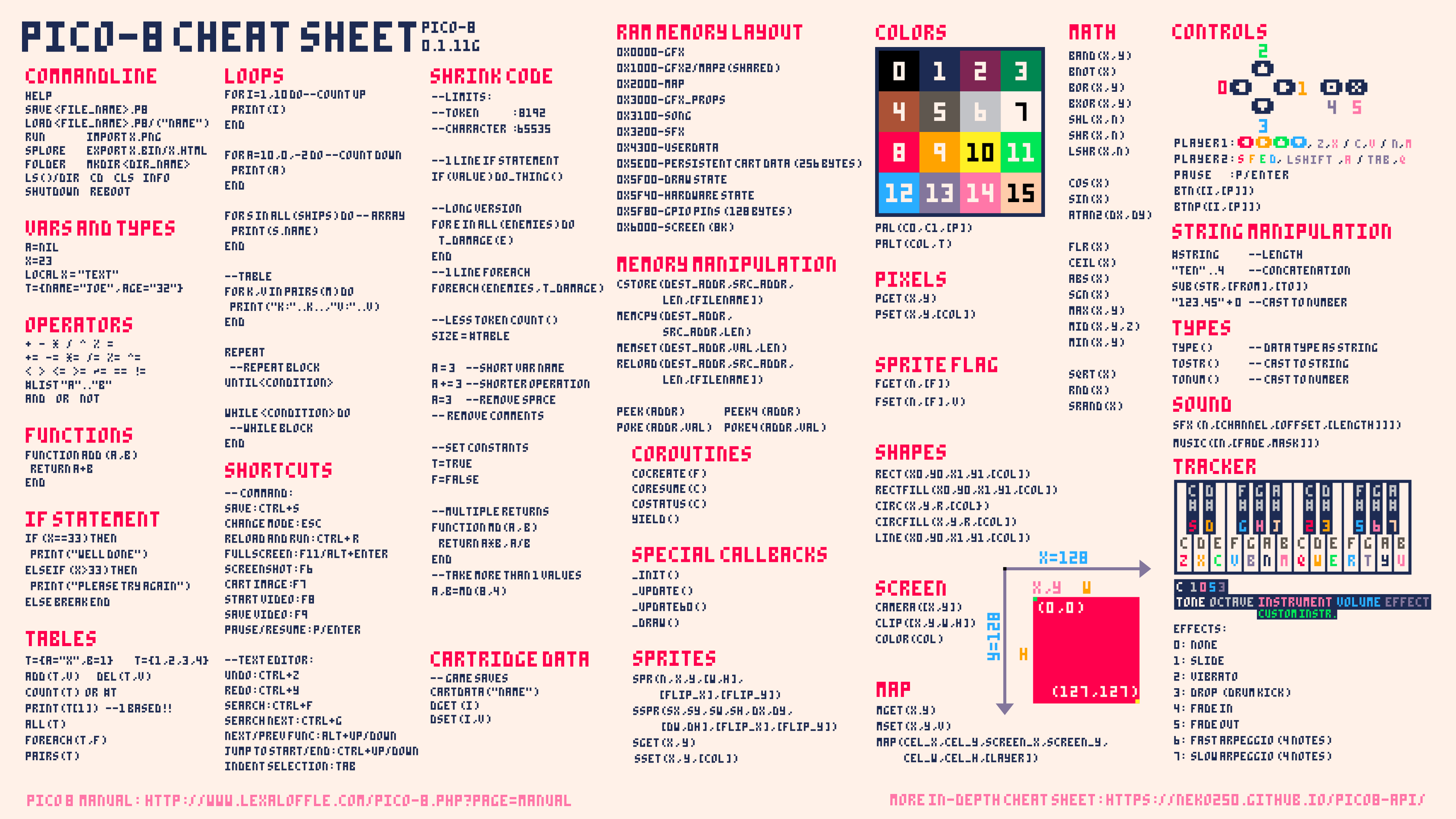
Cheat Sheets by LightBWK (Image) API Cheat Sheet by neko250 (Site)
Lua 5.2 manual Online Lua runner Going from Lua 5.2 to PICO-8's Lua
PICO-ATE Altruistic Template Encyclopedia PX9 compression
Making a Shmup (Lazy Devs) Pico-8 Tutorial Crash Course For TOTAL Game Dev Beginners! (SpaceCat) Making an Advanced Shmup (by Lazy Devs)
PICO-8 Resources Resources (by marcosecchi)
TIC-80 Pyxel ——— Please share your favorite/useful links in the comments as well!
What's your favorite PICO-8 feature?
I enjoy the limited environment, retro-like environment myself. It limits my choices to stay focused on small projects, while providing a fairly robust and modern environment to work in.
Some suggestion about what console to buy?
Original question by @Picasso@thelemmy.club
Was thinking the rgb30… And from witch site?
 View on programming.dev