A community for the Tailscale WireGuard-based VPN. https://tailscale.com/
🌉 bridged from !tailscale@programming.dev by Tidepool

A community for the Tailscale WireGuard-based VPN. https://tailscale.com/
🌉 bridged from !tailscale@programming.dev by Tidepool
Public Domain resolution to private tailscale node?
Let's say I have the domain name domain.blip with a registrar and have the ability to modify the DNS records to my liking. And let's also say I have a few computers on Tailscale with multiple family members participating.
Currently, I have HTTPS support on tailscale via a reverse proxy (nginx proxy man) where I have to update the records every 3 months using tailscale cert. This works, but it has drawbacks. For one, subdomain resolution isn't trivial without connecting all computers to a DNS server like pihole or equivalent. Additionally, all users need to remember the somewhat arbitrary tailscale network name and path to the service. With multiple services working in tandem on the same server, this can mean breaking the abstraction of the network. Lastly, there's the simple hassle of updating the self-signed certs every 3 months compared to, say, let's encrypt which can automate the process.
This is where domain.blip comes to mind. Let's say I wanted a gitea to be available at gitea.domain.blip but, importantly, I want this to be available only for local network users (on the tailscale) and to simply resolve to a generic 404 for non-tailscale users.
Is this possible to do while using a service like Let's Encrypt to automate the SSL ticket creation? Obviously the reverse proxy on the home server would have to handle the other hostname itself, but it should be possible to resolve to a website hosted on a non-public IP address right?
Thanks for anyone who has insights here. I'm also just interested to hear people's experience running a similar setup, even if we're talking about wireguard instead of tailscale.
Internal HTTPS with Headscale
The goal is to share an http service privately on my tailnet but with an HTTPs connection. It seems others have spent lots of time figuring out and never sharing their solutions. I just got a setup to work satisfactorily so I'll share it. Criticism is welcome. First a few notes:
• I'm using headscale on a VPS behind Caddy.
• Official tailscale allegedly can do this out of the box with tailscale serve or tailscale cert.
• Headscale supports tailscale serve but not with https. Maybe if I removed caddy and let headscale to https directly it would. I haven't tested that yet.
• Yes I know https over wireguard is redundant. This effort is not only to make Firefox shut up but to make some clients that demand https work.
I also have deliberately avoided the "Private CA" because installing the cert of every client on my tailnet sounds like a nightmare. If someone can prove me wrong there, please share.
1. I have a VPS and a public domain with DNS A and AAAA records that point all sub domains *.mydomain.net to that VPS.
2. The VPS runs caddy and headscale and is on the tailnet itself.
3. Caddy route the hs subdomain to headscale.
4. I have numerous devices on my tailnet, many running different http services but only some of them I want public.
5. I can publicly expose a service with https by simply adding an entry to caddy like so,
caddyfile
publicservice.mydomain.net {
    reverse_proxy privatehost:8080
}
Restart caddy and that's it.
First, I used sub domains of the public domain instead of headscales base domain. eg Use *.ts.mydomain.net instead of ts.net. I made a *.ts.mydomain.net A record pointing to my servers public IP. Caddy will automatically fetch https certificates for any *.mydomain.net domains automatically. It cannot for a domain not routed to it. (DNS01 authentication might circumvent this but I haven't tested that yet).
Second, I restrict caddy to only accept tailscale connections by using the bind directive. Otherwise it will accept and route public traffic. A caddy entry for a private service would look like this,
caddy
privateservice.ts.mydomain.net {
    bind 100.64.0.1 [fd7a:115c:a1e0::1]
    reverse_proxy privatehost:8081
}
The IP addresses come from the output of tailscale ip on the caddy/headscale machine.
Now privateservice.ts.mydomain.net routes to the caddy server with https but it gets a default blank 200 response from caddy because its coming from the machine's public IP instead of the tailnet.
The last step is to configure headscale's DNS to route private services to the headscale server on its its tailscale IP instead of the public IP.
yaml
# /etc/headscale/config.yaml
# ...
dns:
  magic_dns: true
  # base_domain is irrelevant
  nameservers:
    global: [ whatever ]
    split:
        # required to override the public dns records
        ts.mydomain.net: 100.100.100.100
  extra_records:
     - type: "A"
       name: "privateservice.mydomain.net"
       value: "100.64.0.1"
     - type: "AAAA"
       name: "privateservice.mydomain.net"
       value: "fd7a:115c:a1e0::1"
     # repeat for each service, always the same IPs
You can have base_domain be whatever or make it ts.mydomain.net if you want to be consistent and aren't worried about collisions with your extra records.
I tried using wildcard DNS records in headscale and it didn't work. It felt like it completely broke DNS without any clear warnings or errors. Idk if that's a bug or what. DNS just timed out internally
All internal HTTPS traffic is routed through my VPS instead of directly peer to peer, which is a real bummer for internal latency. I think the only way around that is to give each internal host their own caddy server, have the DNS records point directly to them, but then use a private CA and all the hassle that's worth. Maybe DNS01 challenges will work...
Also while I have no public records indicating what private subdomains I have beyond *.ts.mydomain.net for DNS, I do have them for my TLS certificates... somewhere. I'm not super concerned about that though. I think only a private CA will hide those.
Using Taildrop on Linux
So I use the nemo file browser. I also started using Tailscale recently. I liked the idea of using Taildrop but I wanted a way to not have to use the command line every time. (I don't mind the command line but sometimes, especially for books, I use the file browser). So in ~/.local/share/nemo/actions/taildrop.nemo_action I added the following:
[Nemo Action]
Name=Send to iPad
Comment=Send file %F to iPad
Exec=sh -c "tailscale file cp %F ipad:"
Icon-Name=edit-copy
Selection=notnone
Extensions=nodirs
Separator=,
Dependencies=tailscale
Note, you'll want to change ipad to whatever device you want to send files to. But now, I can right click on a file and click Send to iPad and off it goes! You also might need to do sudo tailscale set --operator=$USER first to be able to run as your user. But if you can run tailscale file cp ... in your terminal (without sudo) it should work.
Of course, it doesn't have to be an iPad, that's just what I have. You can make one for any device you want to send files to.
What is the best UI to manage headscale?
Apparently there's more than just headscale-ui now: Relevant GitHub search Has anyone tried some of them and has an opinion on which is best?
Tailscale runs automatically, CONSTANTLY: What can I do with it?
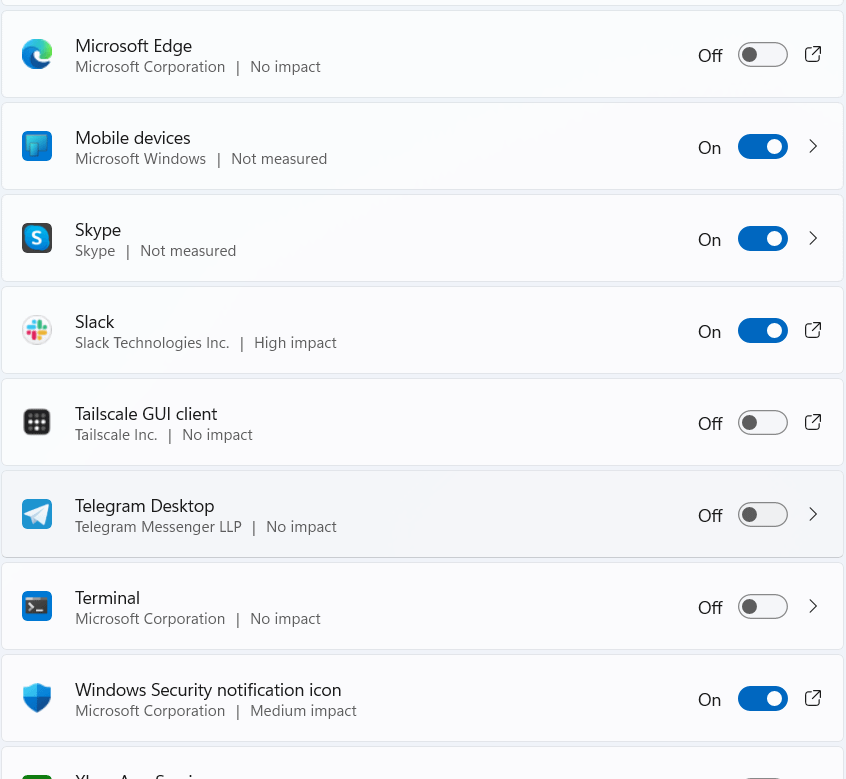
Hi, I use Tailscale, but it's very frustrating for me that it starts automatically almost constantly, at a random moment, using the network data, and I have no idea what to do with it. I've disabled startup, see the screenshot below: image But it still appears constantly in my task manager, using the network and causing it to slow down greatly. The only way to deal with it is to end the task manually via the task manager, which is quite inconvenient, as you can understand. It always appears when I start my Windows and can also appear later when I try to exit it after usage. How can I prevent it from launching without my permission?
Help with a Foundry server meant to be accessed through Tailscale?
Hey all, I'm pretty illiterate when it comes to networking. I'm trying to set up a Foundry server on my PC, using Tailscale to bypass not having a public IP. The first time I set Tailscale up it worked perfectly, I asked a buddy to try and access and he reached the log in screen. The second time, when a session was supposed to happen, it didn't work; tailscaled.exe would launch and immediately quit . I was a few versions behind so I uninstalled, rebooted, installed the new version. Now, I'm getting those same errors regardless of what I do. I'm honestly not sure what to mess with to fix it. Any help would be appreciated.
Secure Connection issues with Tailscale Exit Nodes?
I can't for the life of me figure this out:
I want to use tailscale on my home server as an exit node, but cannot seem to get it to do secure connections properly. I have Nginx Proxy Manager running on the same home server and I wonder if that's causing problems with the HTTPs encryption verification.
Has anyone had similar issues to this? I've tried messing with DNS resolution settings by overriding it to use the server's pihole setup as the DNS provider, but this hasn't helped either. I'm running out of ideas on ways I can try to solve this.
Leveraging Authelia for OIDC Single Sign-On (SSO) with Headscale
cross-posted from: https://infosec.pub/post/28466166
If you've followed any of my self-hosted headscale with Podman series, I wrote up another "bonus" post talking about OIDC configuration with Authelia. Took some trial and error, so I figured I'd document it in the public notebook.

Problem with new Tailscale install to bypass ISP CGNAT
I have a cloud VPS running Ubuntu with Tailscale installed directly. I also have Tailscale installed on my home server. I'm trying to access my self-hosted applications from outside my home network which I did easily until I switched to fiber internet that uses CGNAT. Tailscale is working locally but not outside my home network. A suggestion was to disable IP v4 on Tailscale since it conflicts with the CGNAT IP my ISP is using. However when I add the "disableIPv4": true to the config file in the access control area of Tailscale, I keep getting various errors. Any help would be appreciated.
Git SSH through docker sidecar?
Hey all!
I'm trying to ssh into my tailnet-hosted (through tailscale serve) gogs instance and I can't seem to figure out how. Has anyone tried doing this? Will I need to add a user to the sidecar container and add a shim like they do in the regular gogs setup? I appreciate any insight.
Edit: Modified title for clarity
What is the point of choosing Funnel over just hosting the web server normally?
One thing that comes to my mind is you don’t have to deal with port forwarding. But does it decrease overall attack surface in any way? My big plus for using tailscale at all is it has basically zero attack vectors other than through devices through devices on the same tailnet.
Tailscale v1.62.1
Linux
• (New) Send load balancing hint HTTP request header
Windows
• (Fixed) Do not allow msiexec to reboot the operating system
macOS
• (Fixed) Issue that could cause the Tailscale system extension to not be installed upon app launch, when deploying Tailscale using MDM and using a configuration profile to pre-approve the VPN tunnel (applies to standalone variant only)
Synology
• (Fixed) IPv6 routing
Kubernetes operator
• (Fixed) Kubernetes operator proxies should not accept subnet routes

Updated Users page
Users page of the admin console updated to provide more context around user invitations, user approval, and your tailnet’s identity provider
 View on programming.dev