🌉 bridged from @subtex@lemmy.world by Tidepool

subtex
@subtex.lemmy.world.ap.tdpl.io
Picco running Crosspoint
cross-posted from: https://lemmy.world/post/54346368
Got the Picco and flashed Crosspoint firmware on it. (chapstick in photo for scale) Set up KOReader and ko sync to get it up to date with the book I was reading on the xteink 4 pro. Worked great. If anyone has questions about the Picco, let me know. (but only for Crosspoint on it. I never used it with the default firmware)
Picco running Crosspoint
Got the Picco and flashed Crosspoint firmware on it. (chapstick in photo for scale)
Set up KOReader and ko sync to get it up to date with the book I was reading on the xteink 4 pro. Worked great.
If anyone has questions about the Picco, let me know. (but only for Crosspoint on it. I never used it with the default firmware)
Sidekit launcher and apps
New launcher and sidephone-formatted apps bundle named Sidekit Video: https://youtu.be/iZwJHh70PHU Reddit post: https://redlib.catsarch.com/r/sidephone/comments/1xo88sw/its_been_100_days_since_i_promised_a_new_launcher/ Website: https://sidekit.hrln-interactive.com/ Github: https://github.com/HarlenPostill/Sidekit Some clever ideas for using accessibility labels on ui elements in apps to generate a sidephone-optmized front end for interacting with them.
sidekit.hrln-interactive.com
Sidephone's App Library
(took this stickied post from the subreddit) For a complete and current list of all supported applications, please visit sidephone.com/pages/app-library
How does Sidephone select which apps to add to the App Library?
To feature an application in the App Library, it must be an active project, it must work well on Sidephone's hardware and software, and it must be available for Sidephone to download from an official source. The team then works to determine if it aligns with Sidephone's ethos and the community's values. The goal of the App Library is to provide a few additional tools, utilities and media to make using Sidephone as a primary device more enjoyable, without detracting from the overarching project objective of helping people reach and maintain a deep level of focus and intention throughout their day.
Will Sidephone's supported app list change over time?
Yes, the official list of applications that Sidephone supports is expected to change over time as we expand to more regions, develop more partnerships and create more apps of our own. We do not intend for Sidephone's App Library to have thousands of apps; only core essentials and a few extras.
Can apps that aren't in the App Library be added to Sidephone?
Yes. We recognize that essential tools are different for everyone. For this reason, we have not added restrictions that would prevent 3rd party applications from being added and installed. Sidephone uses AOSP as its base. Before adding applications, please ensure that they were obtained legitimately. Apps that rely on Google services to function (eg. certain health apps, payment apps, communication tools, transportation apps) will not work because Sidephone is de-Googled. Please note, Sidephone cannot guarantee or be held responsible for experiences that you have as a result of installing 3rd party apps, as these are outside of our control.
Why is Sidephone de-Googled?
We did not wish to have Google's hardware and software guidelines (eg. minimum 4 inch screen size) restrict Sidephone's design and development. Creating a truly different mobile phone required us to untether ourselves from existing ecosystems.
Are all apps visible in the App Library?
To keep Sidephone's OS clutter-free, and to keep unwanted apps out of view, each supported app is organized within an 'App Pack'. All App Packs are hidden by default. To enable an 'App Pack', you must scan a QR code, which then reveals all applications within the pack for installation on Sidephone.
Is it possible to use web apps in the browser?
Yes. A number of web apps are available via Firefox & Vivaldi that we have not included in our list (eg. ClassPass, Libby, Cryptee, Pocketcasts)
Qwerty Tile noob
I assumed that once you change the tile on your device, the os would know how to use it. But that is not true.
You still have to swap the keyboard in the os to be qwerty for the keys on the qwerty tile to function properly. I should have guessed this but it did take me way longer than it should have to figure this out.
So in case there are other dumb dumbs out there, here's what you need to do:
On the touchscreen software keyboard, just tap the globe or keyboard icon in the bottom right to bring up the keyboard selection list and choose the qwerty one.
Welcome
I know most people are on the subreddit for the Sidephone, but if anyone is looking for a non-reddit place to discuss this phone or ask questions, I figured we could use one here.
Xteink X4
I picked up one of these a month or so ago. Finally getting around to using it and messing with the open source alternative firmware for it: Crosspoint.
Anyone else have one of these?
So far I'm loving it. Really, aside from the lack of backlight, it's a wonderful traveling reader for me. Yes, semi-annoying converting some books for better formatting but overall can't say it's been that big of a pain to do.
www.xteink.com
A5X2 "Manta" officially Released
cross-posted from: https://lemmy.world/post/23060993
Looks like the leak was correct. Starts at $459
supernote.com
A5X2 "Manta" officially Released
Looks like the leak was correct. Starts at $459
Palma: Kobo app missing from volume buttons settings?
I've noticed the volume buttons do not change pages when in the Kobo app on my Palma.
In the device Settings->More Settings->Short-press Function, the Kobo app doesn't even show up in that list, which is weird.
Anyone have a workaround for this?
A5X2 Product Page
cross-posted from: https://lemmy.world/post/22929553
Seems Ratta put up the A5X2 page by mistake earlier today. It has since been taken down but it was archived at the link posted. The A5X2 is named "Manta". Who knows if the price is correct or was a placeholder, but it says "starting at $459" which is great news of true. Relevant reddit thread here: https://redlib.catsarch.com/r/Supernote/comments/1h9w1lq/manta_from_459/
web.archive.org
A5X2 Product Page
Seems Ratta put up the A5X2 page by mistake earlier today. It has since been taken down but it was archived at the link posted. The A5X2 is named "Manta". Who knows if the price is correct or was a placeholder, but it says "starting at $459" which is great news of true. Relevant reddit thread here: https://redlib.catsarch.com/r/Supernote/comments/1h9w1lq/manta_from_459/
Bigme, Let's Talk. B1051C Color E-Ink Tablet
youtu.be
Kitt Betts-Masters has a video up on the new Bigme B1051C color eink tablet.
Haven't seen much info on this model out there.
youtu.be
Drawing on the Note Air 4C (reddit)
Found this on reddit and thought it was interesting with regards to showing how a different stylus really does have an effect on how the drawing tools respond.
This post has some examples showing pressure differences using the Boox stylus vs the Remarkable one. Similar to my other posts here.
redlib.catsarch.com
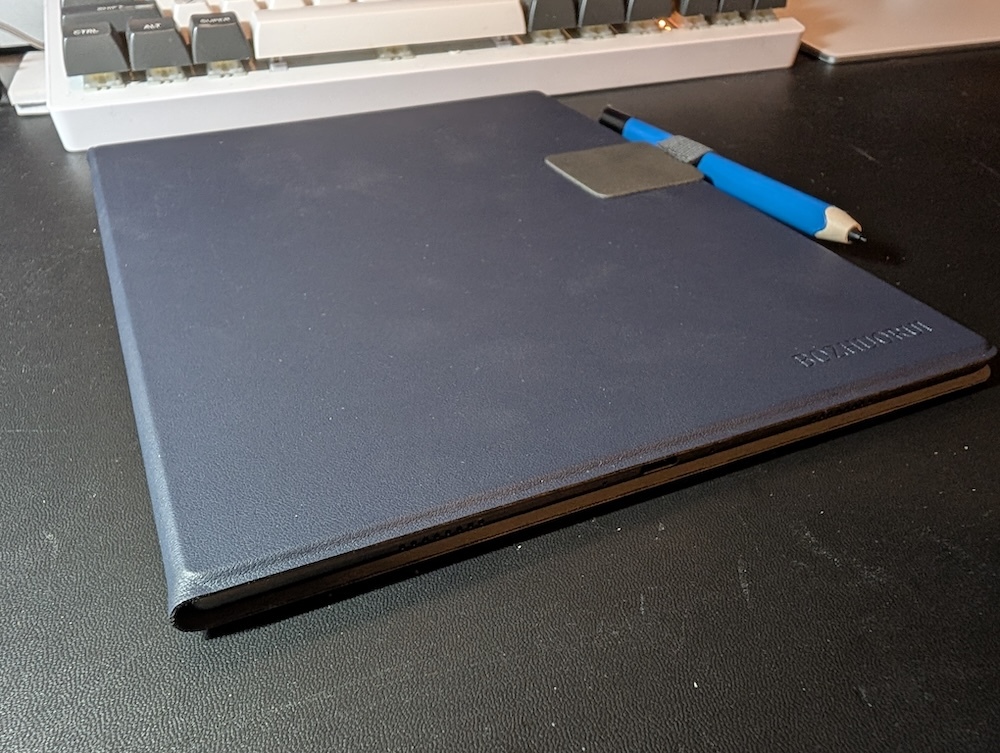
BOZHUORUI Magnetic Case for Boox Go 10.3
Picked up this case from Amazon since I didn't like the colors on the official case. I had to buy a pen loop for a stylus, but aside from that, this is a basic no-frills magnetic case that I don't have much to complain about. The magnets hold the device secure enough that I don't feel worried about carrying it around. If you search that case on Amazon you'll see it comes in other colors too. For ~$26 it's not a bad deal. Some more pics: image image
- Boox
Old woman smoking
Another sketch on the Boox Go 10.3 using the Staedtler Mars Jumbo stylus. Really digging the feel of the screen on this device. Shame that the pencil tool is pretty garbage. But the pen tools are definitely great. Here's the exported png: image
- Boox
Simple Sketch
The first sketch I did on my Boox Go 10.3. Top one was the brush pen tool. Bottom was the normal Pen tool. Unlike my Supernote, I use the pen tools on the Boox exclusively and hate their pencil. It's the opposite on the Supernote in the Atelier drawing app. The pencil on that is fantastic. Here's the exported png: image
- Supernote
Atelier sketch
Here's how it looks exported as a png: image I definitety prefer how everything looks on-device vs the export, but I found if you don't use the marker or any shading tool, things look better when you export. I'm not a fan of the zip-a-tone look of the shading when you export the markers so I stick to the pencil tool.
- Supernote
Atelier sketching
cross-posted from: https://lemmy.world/post/20446230
Still messing around with Atelier and figuring out the combo of which tools it offers and which stylus to use. The pencil tool and the Staedtler Noris Jumbo is the best combo for how I like to sketch so far. This sketch is the 8B pencil. I wish the pen/ink tools were better. The screen on the Supernote really is nice to draw on
- Supernote
Staedtler stylus comparison
cross-posted from: https://lemmy.ml/post/20925524
I've had the Staedtler Noris Jumboand love it for drawing. I just purchased the Staedtler Mars Lumograph Jumbo and wanted to test the differences using the pencils in Atelier. Here's a photo of the results. The columns are: L - Light pressure lines H - Hard pressure lines T - Tilt/attempting to shade lightly X - Crosshatching with various pressure The Mars is soft feeling like the Noris, which I like. But I found that I could not get as light a pressure /line with the Mars as I could with the Noris. You can see that in the photo too. I think I'll stick with the Noris for art, but will add the Mars to the rotation for note taking.