🅸 🅰🅼 🆃🅷🅴 🅻🅰🆆. 𝕽𝖚𝖆𝖎𝖉𝖍𝖗𝖎𝖌𝖍 𝖋𝖊𝖆𝖙𝖍𝖊𝖗𝖘𝖙𝖔𝖓𝖊𝖍𝖆𝖚𝖌𝖍
Ceterum Lemmi necessitates reactiones
🌉 bridged from @sxan@midwest.social by Tidepool



@sxan.midwest.social.ap.tdpl.io
11 Posts0 Comments0 Memberships
Joined November 2026
🅸 🅰🅼 🆃🅷🅴 🅻🅰🆆. 𝕽𝖚𝖆𝖎𝖉𝖍𝖗𝖎𝖌𝖍 𝖋𝖊𝖆𝖙𝖍𝖊𝖗𝖘𝖙𝖔𝖓𝖊𝖍𝖆𝖚𝖌𝖍
Ceterum Lemmi necessitates reactiones
🌉 bridged from @sxan@midwest.social by Tidepool
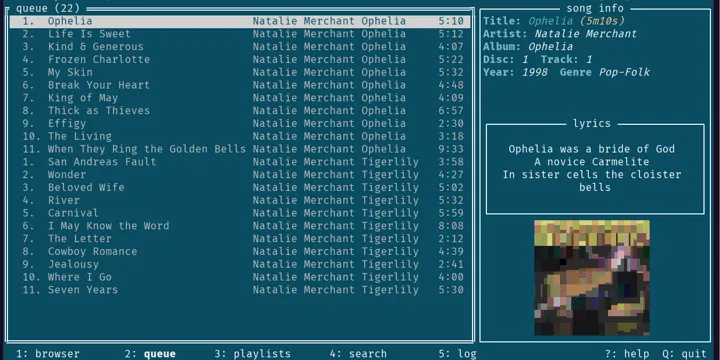
ANN: ostui v1.1.1, an OpenSubsonic TUI
ostui is a terminal client for OpenSubsonic music servers, inspired by ncmpcpp and musickube.
• Browse by Artist
• Browse by genre
• Queue songs and albums
• Create and play playlists
• Search music library
• Mark favorites
• Volume control
• Persistent play queue (re-load after restart with l)
• Server-side scrobbling (e.g., on Navidrome, gonic)
• MPRIS2 https://mpris2.readthedocs.io/en/latest/ control and metadata
• A toggle-able song info panel in the playlist containing song information, lyrics, and cover art
• Synced lyrics are shown, and synced with the music, if the server supports getLyricsBySongId; this is supported in both Navidrome and gonic, and possibly other OpenSubsonic servers
• The search tab can toggle between "search for anything" (via search3/ ), or search-by-genre (via getSongsByGenre/. As part of this, switching to the genre search in the search tab with 'g' also shows a list of all known genres, which can be browsed.
• CLI params & config settions for some UI toggles (track & album columns, song info) • Optional track & album display in the play queue list ('T', 'A') • The playlist can be sorted by title, track number, or album
There's a releases link on the project page; I build assets for Linux and Darwin AMD and ARM64. ostui is in AUR and Alpine testing (the current release may take a day or two to show up in Alpine). ostui was hard-forked in 2024 from stmps, itself a hard fork of stmp.
CLI-based bookmark manager, based on indexing visited sites and search-engine-like queries?
cross-posted from: https://piefed.zip/c/commandline/p/1389995/cli-based-bookmark-manager-based-on-indexing-visited-sites-and-search-engine-like-queries Funny thing: I just discovered Piefed doesn't implement cross-posting. So, crossposting from an alt. Most of the cases where most people use bookmarks, I want a search engine based on only sites I've visited. I don't know whether I'm dramatically different from other people, but by the time I'm looking for a site, I've forgotten the most unique attributes, and even my own tagging often ends up tagging the wrong sorts of attributes. Tagging is still better for me than hierarchical organization, but what I really want is a sort of command-line search engine that searches only sites I've visited before. I've frequently thought about building such a thing, but every time I do I think, "someone must have already built this." So: Does anyone know of a tool like bmm or buku, but which indexes the URL's main page, and has a command-line tool for keyword querying the DB like a search engine? As in, performing stemming and lemmatization? It'd be like bmm/buku's tag search, only the tags would be a search engine index of the page. What I do not want is • a self-hosted, web-based UI search engine • a self-hosted bookmark manager; buku and bmm are already both fine tools, and I'm not trying to solve "access all my bookmarks from everywhere". That latter I can do with rsync or syncthing. • a command-line bookmark manager... unless it conforms to the constraints above: queries should function on a full-text index of selected web pages. Again, buku and bmm would be fine if my tagging skills were better. • a crawler-based search engine I do want: • the convenience of giving the tool a URL and having it auto-tag. buku does this, except that IME the resulting tags correlate even less well to how I remember things when I want to search than my manual tagging does. • some fuzziness in the search; my current problem is how constrained the searches are. This isn't their failing; I simply have obtuse recollection skills. I tag "dog,pet,animal", but when I'm looking for it, what I remember is "it's got four legs". • local, command-line • indexing a page of a given URL. Recursive is optional; I probably wouldn't use it, but if it's there that's fine. I just want to be able to limit the indexing to a single page. This is my last ditch effort to find an existing tool; otherwise, I'm going to build it, because it's not a hard problem. Which is in part why I'm having trouble believing someone hasn't already built it.
Shamir's Secret Sharing Algorithm library
sss-vlang v0.0.1
Shamir's Secret Sharing algorithm is a mechanism for splitting a secret S into n shares, of which k are required to recover the secret via a combine function. This library is a translation of sssa-go, which has been externally verified as being a well-designed implementation of the algorithm. This V version improves slightly on the Go version by handling (not ignoring) function errors.
One use case for SSS is to provide N people with keys to allow N-k of them to collaborate to produce a key that can, e.g., decrypt a digital resource. For example, 10 employees might be given keys, with any 5 being required to collude to generate a secret to open a KeePass DB that contains credentials for a server hosting master admin account.
The library has extensive unit tests and good coverage. The project includes two tools: sssc, which is a command line split and combine tool; and sssg, a GUI version.
The algorithm is stable. The library API at this point is mostly stable, and should not change much. sssc is complete, and I expect changes to include only feature additions. sssg is very definitely a WIP, as I figure out the gui package.
Performance of this library is not very good; it runs far slower than the almost Go library it was cloned from; I have not yet tried to optimize it, since performance is irrelevant for the use I have in mind. However, I suspect there is low hanging fruit here, and I'll get to it sooner or later.
Is there a keyboard like the Piantor Pro, but with a better thumb-key layout?
Something like this? The heavy stagger is great, 42 keys is almost perfect, but the thumb placement is -- for me -- horrible. Having to move my thumb to practically under my palm is just terrible ergonomics.
This thumb layout reminds me more of the ErgoDox variants, and is far better placement. Is there a layout close to this?
ANN: tjot v0.0.5, a terminal renderer for djot
tjot is a terminal djot renderer.
• Covers 100% of the Djot spec
• Reasonably fast:
• pandoc -f djot -t ansi: 10 runs, milliseconds per run: [266, σ 270, 274]
• tjot: 105 runs, milliseconds per run: [24, σ 26, 28]
• ANSI glyphs & escape codes for nice tables, task lists, and coloring
• Renders images, including SVGs
• Detects the terminal size (usually) for accurate wrapping
• Langage-sensitive highlighting for code blocks, and language detection
tjot is alpha; this is the first version that is useful. That said, it's fairly complete.
djot is a markup language related to Markdown created by John MacFarlane, the author of pandoc. For a detailed explanation of why he invented djot, see this essay, but my interpretative summary is that he was unsatisfied with the complexity and size of CommonMark -- a result of trying to maintain compatability with Markdown -- and thought they could do better from scratch. djot was the result. I've been using djot since late 2022, but as there (until recently) was no terminal pager for djot, I finally decided to write one. To render djot documents on the command line, install tjot and call it with the path to a file, or pipe the file into tjot on stdin. Pipe the output to a pager such as less. If the document references images via URL, those will be downloaded and rendered.
• There are known bugs; see the end of the CHANGELOG for a complete list • Ultimately, I want a pager. The current version only renders output; paging has to be provided by an external program • Customization is non-existent • While images are supported, rendering is via asci; there's no sixel, kitty, or other high-res rendering. SVG rendering, in particular, is of particularly questionable quality. ——— As usual, feedback is welcome, as are any reports of failures. Although this is an early release, the nature of the project is such that getting exposure to a wide variety and complexity of documents will help me improve it.

Rook v0.3.0, a secret service backed by a KeePass v2 DB
Rook provides a secret service a-la secret-tool, keyring, or pass/gopass, except backed by a Keepass kdbx file.
The problem Rook solves is mainly in script automation, where you have aerc, offlineimap, isync, vdirsyncer, msmtp, restic, or any other cron jobs that need passwords and which are often configured to fetch these passwords from a secret service with a CLI tool. Unlike existing solutions, Rook is headless, and does not have a bespoke secrets database full of passwords that must be manually synchronized with Keepass; instead, it uses a Keepass db directly.
Rook is in AUR and in Alpine community (a MR has been submitted for the new version); binaries are available from the project page.
There have been several releases since my last announcement for v0.2.0, 7 months ago. The major thing is that I've added built-in support for the Linux keyring, which makes it much easier to use; since it improves security, I'm hoping this will encourage users to use the feature.
Here are the rest of the changes, collapsed for brevity:
• built-in support for the kernel keyring on Linux. • Go 1.24 landed in Alpine, so off we go!
• autotype and getAttr now detect if keyctl is available and in use, and automatically uses it to get the pin. (which should be superceded by ---keyring)
• the kernel keychain instructions are now independent of external environment variable management, such as herbstluftwm
• Use Go 1.24's go tool for manpage generation, via go:generate.
• --keyring may not be used with open; this is now prevented, and documented. It never worked, but it would be seen by the server as on open failure.
• --detach and -P didn't play nicely; now they do
• URLs in the README (thank, mlc-man!)
• getPassword() was prompting on STDOUT, which is bad for piping the pin
• --detach never worked
• logging was going to stdout
• some log messages were not being logged, but just printed out
• PIN authorization had a lot of bugs
• build assets now contain man pages & other documentation, and arch image CI is fixed
Ea-Nasir's customer service is horrible!
cross-posted from: https://jlai.lu/post/17187098
Hmmm
We should start calling it the "Web" Generation
I've noticed increasing requests in places like !selfhosted@lemmy.world people asking for self-hosted or free web solutions for things that, to me, seem to be absurd tasks to go to web apps for. Examples I've seen are:
• Self hosted file hasher
• Self hosted image resizer
• Note apps
There are dozens of these. They vary in the amount of "reasonably benefit from being online," but mostly I'm coming to believe that it's because this group of people either don't realize there's a difference between native and web apps, or ... well, I don't know what the alternative is.
Going to a web app to resize an image is sheer idiocy. It's something for which there is a dozen of free, open-source, native mobile apps that don't require an internet connection, are faster, and are entirely within the capability of any mobile smart phone that would be able to access a web page. And it's even crazier on the desktop: even if you are incapable of using a CLI and running convert, you're probably running some desktop that has a graphics program that can resize an image. Why, the hell, would you self-host a service like this? The same goes for generating checksums of files.
Ok, so you need something to actually host an image for you, because your Lemmy client seems incapable of uploading images. That's a web service. And note taking? That's on the "almost acceptable as a web service", if you for some reason can't run SyncThing. Again, there are GUI markdown editors galore, text editors for the raw doggers, and numerous mobile apps that can more-or-less WYSIWYG markdown much less just plain text editors.
I haven't yet seen someone ask for an online calculator, but it's just a matter of time. Just... why? Are people really no longer capable of distinguishing between web and native apps, or is there some other reason I'm overlooking?
correcthorse, in 27 lines of bash
http://xkcd.com/936/ Not worth creating a project for, and it might be interesting to see what changes people would make. Non-standard dependencies: • words, for the dictionary • zsh (this will probably work just fine with bash, though, too)
#!/usr/bin/zsh
# Author: @sxan@midwest.social
# 2025-02-23

final=(xargs echo)
count=6
while getopts d opt; do
	case $opt in
		d)
			final=(tr 'A-Z' 'a-z')
			;;
		*)
			printf "Password generator based on the correcthorse algorithm from http://xkcd.com/936//n/n"
			printf "USAGE: %s [-d] [#]\n" "$0"
			printf " -d  make the result all lower case; otherwise, each word will be capitalized.\n"
			printf " #   the number of words to include. Defaults to 6."
			exit 1
			;;
	esac
done
shift $(($OPTIND - 1))
[[ $# -gt 0 ]] && count=$*

shuf -n $((count * 2)) /usr/share/dict/american-english | \
	sed 's/'"'"'.*//; s/^\(\w\)/\U\1/' | \
	sort | uniq | shuf -n $count | xargs echo | \
	tr -d ' ' | $final
What's going on here:
Nearly 30% of the American dictionary (34,242) are words with apostrophes. They could be left in to help satisfy password requirements that demand "special characters," but correcthorse isn't an algorithm that handles idiot "password best practices" well anyway. So, since every word with an apostrophe has a pair word without one, we pull 2·N words to make sure we have enough. Then we strip out the plural/possessives and capitalize every word. Then we remove duplicates and select our N words from the result. Finally, we compact that into a space-less string of words, and if the user passed the -d option, we downcase the entire thing.
Without the user options, this really could be a 1-liner; that's how it started:
alias pony="shuf -n 12 /usr/share/dict/american-english | sed 's/'\"'\"'.*//; s/^\(\w\)/\U\1/' | sort | uniq | shuf -n 6 | xargs echo | tr -d ' '"
Am I seeing a bug? Does anyone else see this?
I'd like to know if I should file a bug, or if this is just something in my config. In particular, I'd be grateful for confirmation about what I'm seeing. In Raccoon, in this post, I see only the first paragraph of the post. If I "view raw," I can see the entire post text; it also shows up correctly in Thunder, and in the web interface. I don't see a way to expand the post, and I'm not sure if it's only this post or if it's happening a lot and I just haven't noticed, because the only way to detect missing content is through the "view raw" function. Is this a setting, or a bug? I

Reduce/alleviate nausea?
I do not have CHS, a symptom of which is vomiting. I have never vomited from cannabis. I have always, however, gotten the spins, and almost invariably spend the high uncomfortably nauseous. It really doesn't matter how much I take; anything more than a microdose and I get nauseous. I've been this way forever, since the first time I tried it.
I live in a state where recreational use is legal, and it really irks me that I can't partake.
Does anyone have any advice about what I could do to get rid of the side effect of nausea? Why does this happen to me‽
