Wormhole
Icon base by Caro Asercion under CC BY 3.0 with modifications to add a gradient
🌉 bridged from !cool_github_projects@programming.dev by Tidepool

Icon base by Caro Asercion under CC BY 3.0 with modifications to add a gradient
🌉 bridged from !cool_github_projects@programming.dev by Tidepool
behave: record how a CLI tool behaves, then replay it against a rewrite of that tool
behave is a small Go tool (MIT) I made for checking whether a rewritten command line tool still behaves like the original.
You point it at the original binary. It reads --help, generates a few hundred cases (each flag, some values, stdin and file inputs, bad arguments), runs them and records stdout, stderr and the exit code into a YAML spec. Then you replay that spec against the new binary and every difference shows up as a failing case. Timestamps, pids and temp paths can be masked with regex rules, and the spec can live in CI.
I mostly used it on the uutils Rust rewrites of GNU coreutils, findutils, sed and procps. That led to 44 upstream bug reports and 51 fix PRs, 34 of them merged.
Install: go install github.com/emirmrkaljevic/behave/cmd/behave@latest (or the Homebrew tap). Feedback welcome.

idemkit: runs your code once per key, even when two requests race or a worker dies
I idemkit after cleaning up duplicate charges one too many times. The version everyone writes checks whether a key has been seen and replays the stored response. Two requests a millisecond apart both find nothing and both charge the card. And if the worker dies between charging and recording it, the retry charges again. Neither reproduces locally. idemkit does it properly: an atomic claim instead of check-then-act, a lease that expires on the storage server’s clock, and a fencing token so a stalled worker can’t overwrite a good result.
from idemkit import idempotent, RedisBackend, MethodConfig

@idempotent(
    backend=RedisBackend.from_url(“redis://localhost:6379”),
    config=MethodConfig(key_fields=[“order_id”]),
)
async def charge(*, order_id, amount):
    return await payments.charge(order_id, amount)
One core, three ways to use it: middleware for FastAPI/Flask/Django, a queue consumer wrapper or @idempotent on any function. Backends are Redis, Postgres, Mongo, DynamoDB, or in-memory for tests.
pip install idemkit, Apache-2.0: https://github.com/idemkit/idemkit
If you find it useful, I’d appreciate a star. It’s new, so visibility helps a lot right now.
I built a TypeScript SDK to make Signal bots easier to create
Hello 👋 I was frustrated by how difficult it was to send simple automated messages on Signal without diving into complex protocol specs. Most existing solutions felt too low-level for a quick project. I made this SDK to wrap signal-cli. It uses a persistent JSON-RPC connection to keep things fast and includes a basic bot framework for routing commands. It’s built with TypeScript and Node.js: https://github.com/benoitpetit/signal-sdk I’d really appreciate some feedback on the architecture, especially how I’m managing the background process.

BadWebsiteBlocklist: A blocklist I made that removes spam & low-effort websites from search results
cross-posted from: https://programming.dev/post/24064981
Much like everyone else, I got fed up with search engines. So I decided to make a giant blocklist that cleans up garbage search results! I browsed other blocklists and wasn't very satisfied from what exists now; the goal of this one is to be super organized and transparent, explaining why each site was blocked via issues. Contributions welcome! Even though around 100 domains are blocked so far, I already noticed a big improvement in casual searches. You'd be surprised how some AI generated websites can dominate the #1 page on DuckDuckGo.

Why Do Some Maintainers Close GitHub Issues So Aggressively?
One frustrating trend I’ve noticed in many open-source projects is maintainers closing issues as quickly as possible—often in a dismissive and even confrontational manner. It sometimes feels like a game, where the goal is to shut down as many issues as possible rather than foster meaningful discussion.
But here’s the thing: issues aren’t just demands for the maintainer to do work. They serve a much bigger purpose in open-source projects:
✅ They help users realize they’re not alone—people with the same issue can come together, share insights, or even hire someone to solve it.
✅ They serve as documentation—a record of what’s been discussed, what problems exist, and what solutions have been proposed.
✅ They create opportunities for new contributors—someone trying their hand at coding might pick up an issue, or someone with the same problem might decide to implement a fix.
✅ They signal what users actually need—even if the maintainer doesn’t plan to fix something, an open issue can indicate demand to potential contributors.
But when an issue gets shut down immediately, all of this breaks down. Closed issues don’t appear in GitHub’s default search, meaning 99% of people who might have seen it now won’t. This leads to:
• Duplicate issues because users can’t find past discussions. • Missed opportunities for new contributors to pick up low-hanging fruit. • Users feeling unheard, which can make them disengage from the project entirely. • Preventing others from seeing the issue and potentially contributing.
So why do some maintainers do this? Why Maintainers Close Issues So Aggressively
There are a few common reasons:
🔹 Burnout & Overload – Many maintainers are drowning in issues, and closing them fast is a survival mechanism.
🔹 Entitlement Fatigue – Dealing with demanding users can make maintainers defensive and dismissive, even toward good-faith issues.
🔹 “Keeping the Board Clean” Mentality – Some maintainers see issues as a to-do list, not a place for discussion. They close anything that doesn’t fit their personal roadmap.
🔹 Power Trip – Let’s be honest—some people just like saying “no.” They get used to shutting things down and enjoy exerting control.
🔹 Lack of Interest – Not every maintainer wants new features or community discussions. Some prefer to build things their own way and reject anything that doesn’t align.
Of course, every project is different, and maintainers have the right to decide how they manage their issue tracker. But closing everything by default discourages contribution and community involvement. A Better Approach?
Instead of aggressively shutting things down, maintainers could:
✅ Leave issues open for discussion, even if they don’t plan to act on them.
✅ Use labels like “help wanted” or “waiting for contributors” instead of closing things outright.
✅ Let issues sit for a while to gauge community interest. If nobody cares, they’ll fade naturally. If people keep commenting, that’s a sign it’s worth keeping open.
✅ Recognize that open-source isn’t just about code—it’s about community. The issue tracker isn’t just for them, it’s for everyone who might contribute.
What’s your experience with this? Have you seen issue-closing behavior that helped or hurt a project?
I present: Managarr with Sonarr support!
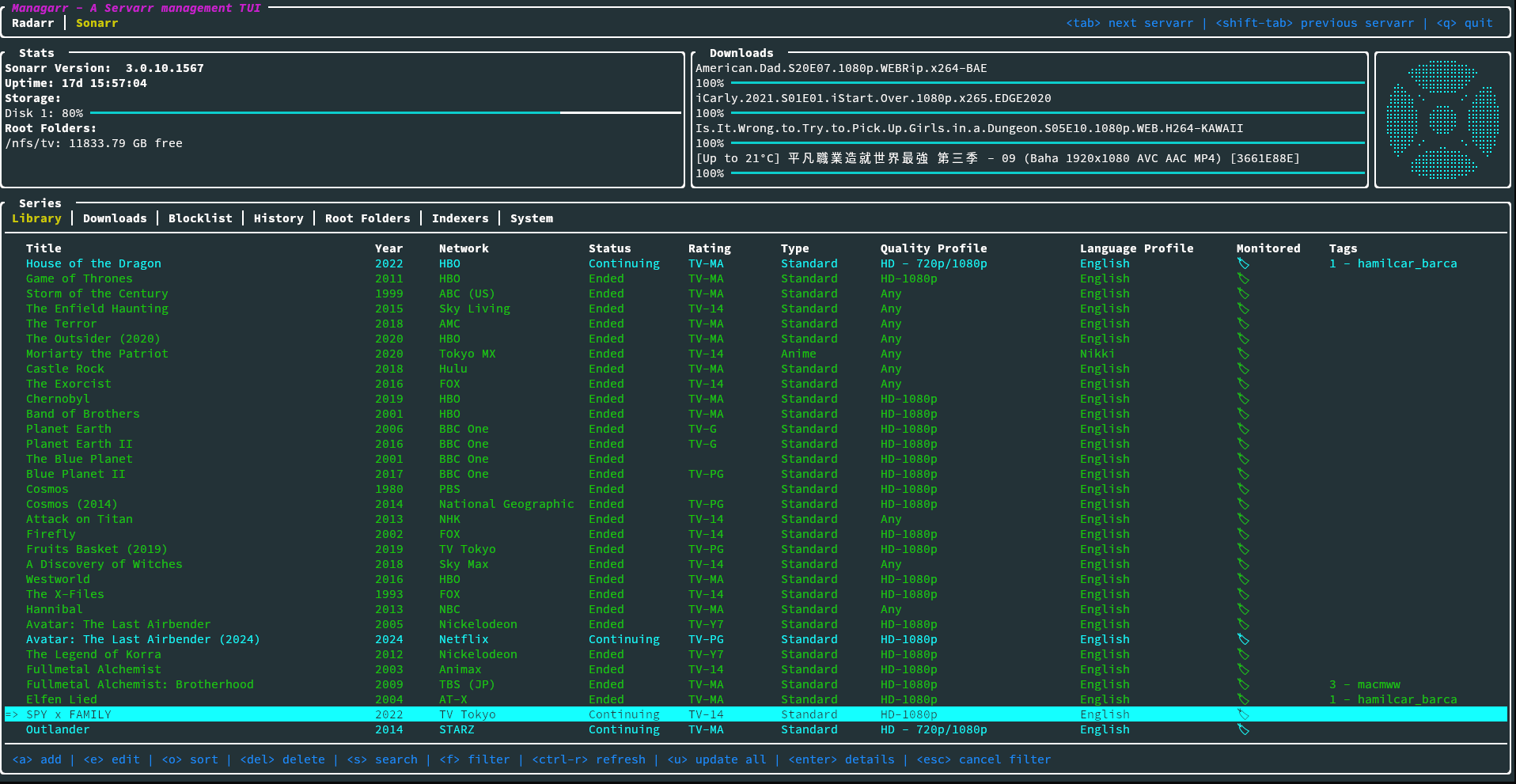
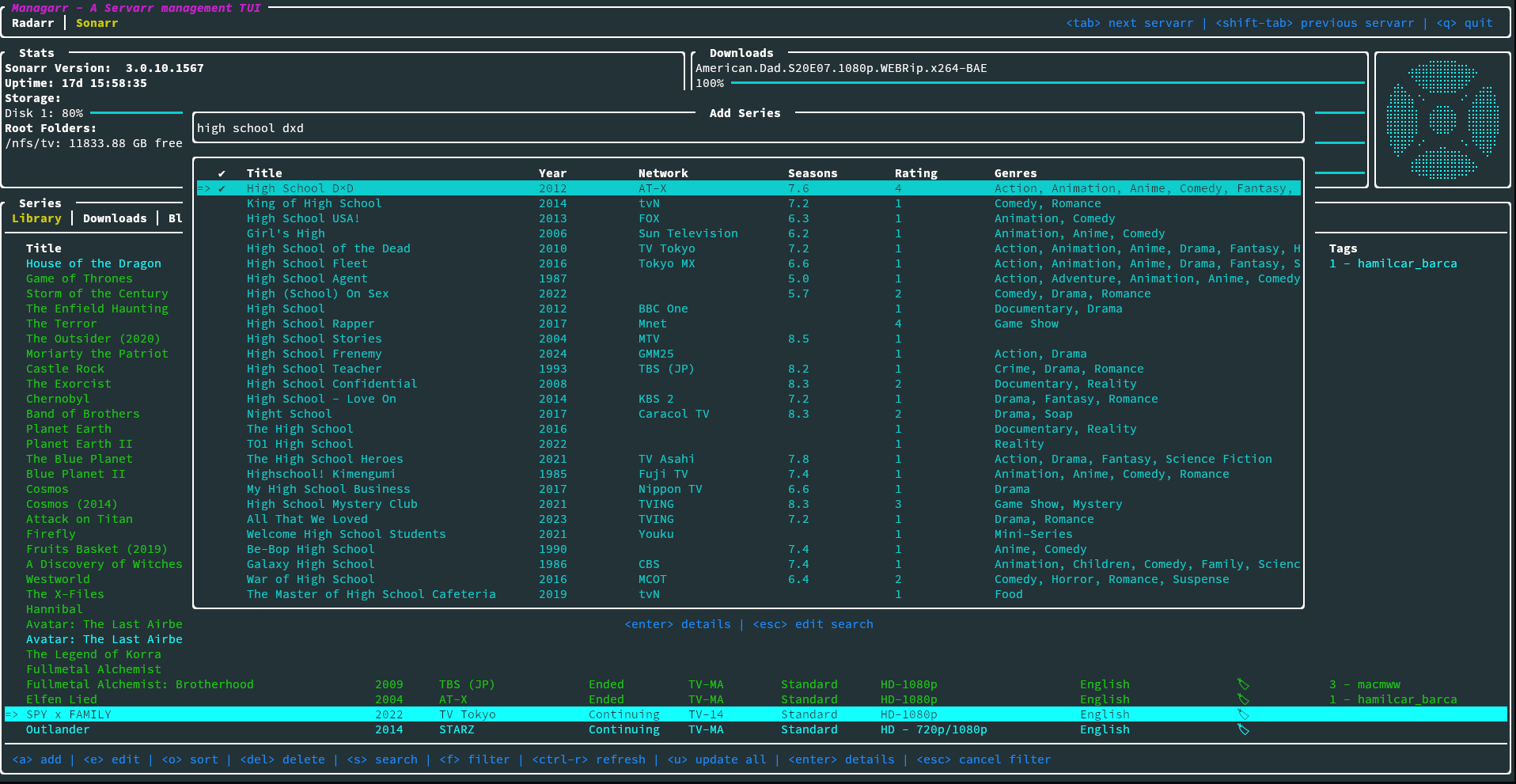
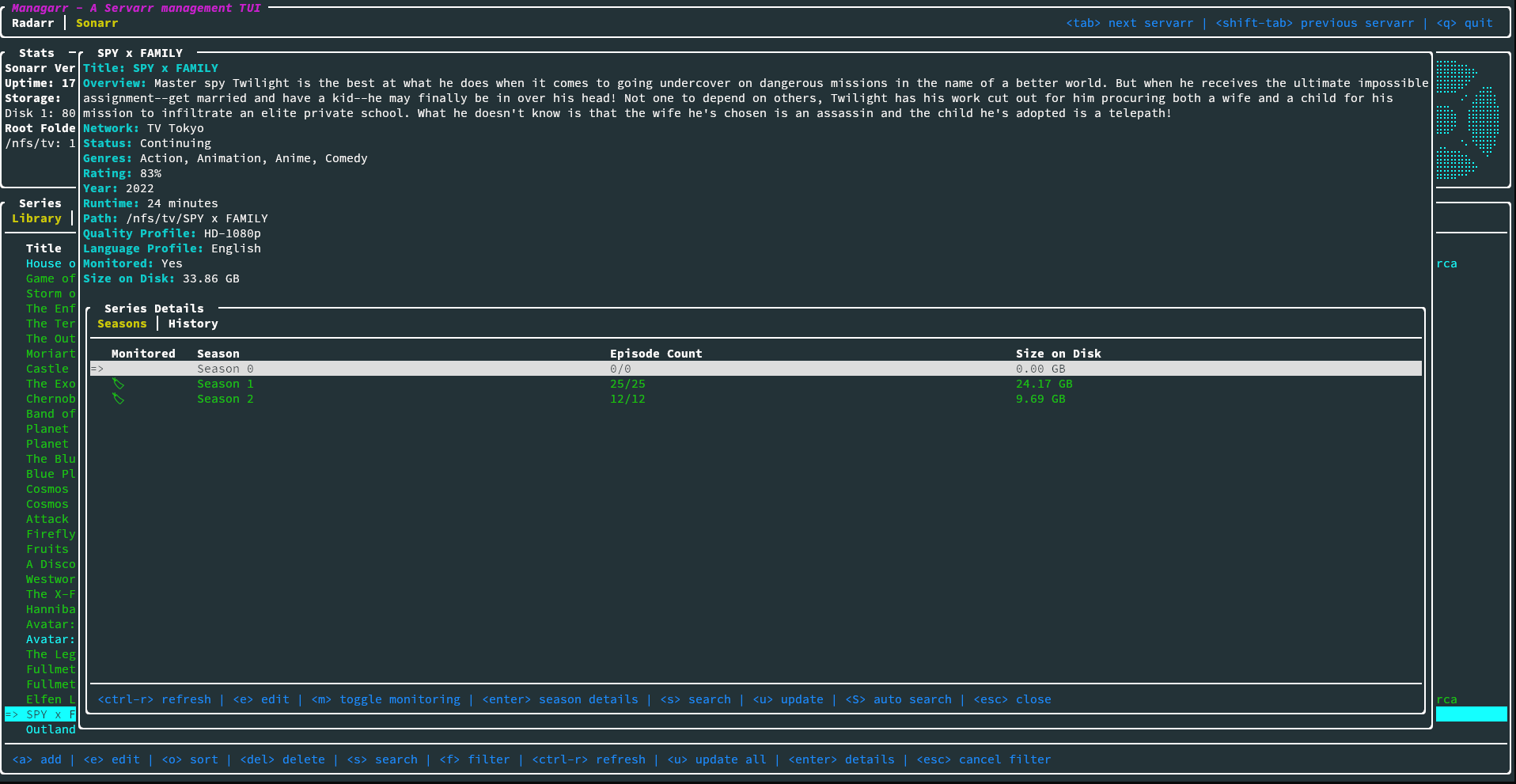
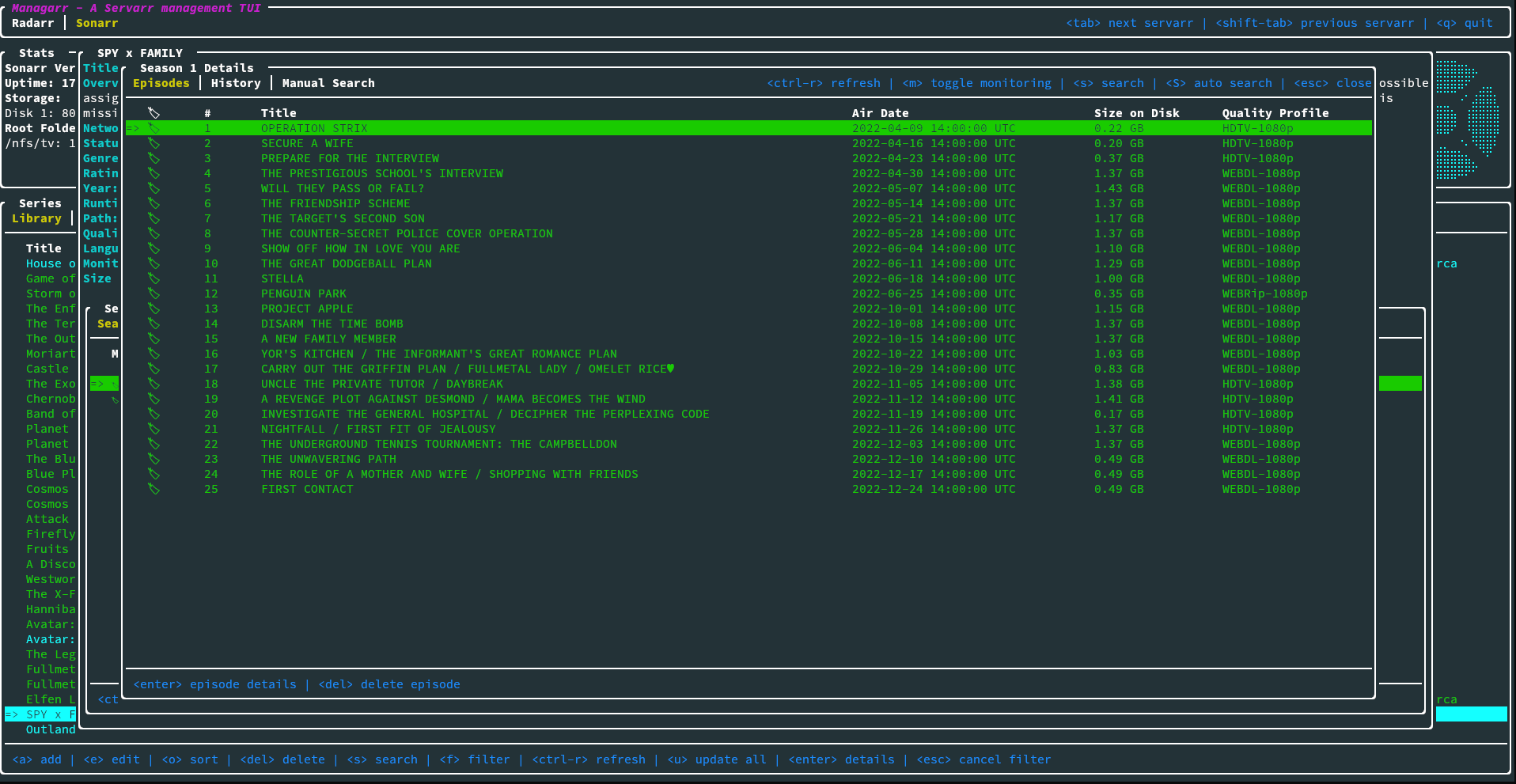
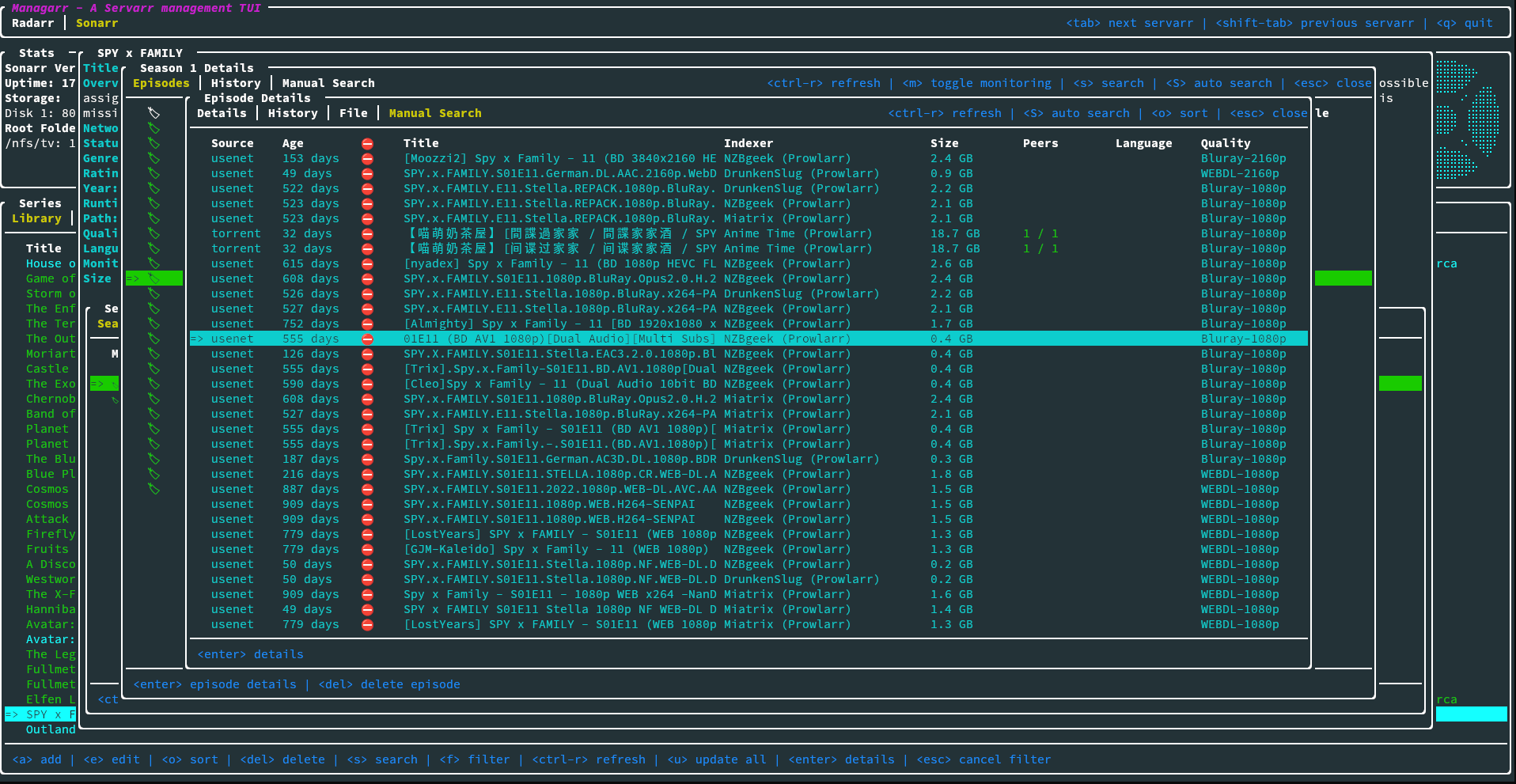
I was recently furloughed from work, so in between job applications, I decided to polish off Sonarr support in my Managarr TUI. Thus, I'm very proud to announce the beta release of Managarr with Sonarr support! TL;DR: Managarr is a TUI and CLI for managing your Servarr instances. As of now, it now supports both Radarr and Sonarr and all the features that are available in the UI are also available in the CLI for scripting and additional automation. The new version has the following features: • Wider platform support (Windows, Mac, Linux, x86_64 and arm64) • View your library, downloads, blocklist, episodes • View details of a specific series, or episode including description, history, downloaded file info, or the credits • View your host and security configs from the CLI to programmatically fetch the API token, among other settings • Search your library • Add series to your library • Delete series, downloads, indexers, root folders, and episode files • Trigger automatic searches for series, seasons, or episodes • Trigger refresh and disk scan for series and downloads • Manually search for series, seasons, or episodes • Edit your series and indexers • Manage your tags • Manage your root folders • Manage your blocklist • View and browse logs, tasks, events queues, and updates • Manually trigger scheduled tasks • Manually trigger scheduled tasks • And more! Here's some screenshots of the Sonarr tab: image image image image image Thanks to everyone's feedback when I first posted the alpha release here, this version sports a handful of additional performance improvements and platform support. This is now technically in beta, so if anyone encounters any issues, please let me know!

GitHub Changelog Generator
I built a small client-side website that can generate a nice, beautiful changelog using conventional commits. I would appreciate very star. https://changelog.pandadev.net/ https://github.com/0PandaDEV/changelog
Browsers on Linux HowTo: a cookbook style tutorial for installing all kinds of browsers
You won't see chrome in the list, but you will see chromium and several of the most popular Chromium based browsers listed that probably aren't readily available in your distro's package manager - some will be, but what about the obscure, purpose built browsers, and those that support longstanding and traditional (or newer) protocols that were removed from the browsers with the biggest footprints in adoption? This isn't they way it needs to be. In this cookbook style tutorial I'll show you how, step by step to install around 20+ different browsers and keep them updated. Based on Debian 14 (Forky), running kernel version 7.1.3+deb14-amd64. There's something here for you, and much to share with others too! The Linux Browser HowTo #tallship #FOSS #browsers #Microsoft_Edge #Firefox #Vivaldi #Brave_Browser #DuckDuckGo #Chromium #Opera #Chawan #Lagrange #Tor #Lynx #Elinks #Links #Nyxt #Epiphany #Falcon #Konqueror #privacy ⛵
Managarr v0.6.0 is Out and now supports Themes, Vim keybindings, custom API headers, and more!
Managarr v0.6.0 has been released with some fun new features! Managarr is a terminal-based application for managing all your Servarr instances from one place. It provides a user-friendly interface to interact with your media libraries, making it easier to manage your downloads, monitor your series and movies, and perform various actions directly from the terminal. It sports two modes: a TUI mode (Text User Interface) and a CLI mode (Command Line Interface). TUI mode gives you an interactive User Interface right inside your terminal window, allowing you to navigate through your Sonarr and Radarr libraries, view details about your series and movies, and perform actions like adding or removing items, all through keyboard shortcuts. CLI mode lets you execute commands directly from the terminal to manage your Servarr instances without needing to open the TUI. This is great for quick tasks or for integrating with scripts and automation tools.
The UI has been completely overhauled to support themes! You can now customize the look and feel of Managarr to suit your preferences. Choose from a variety of themes to change the color scheme and overall aesthetic of the application. Here's just a few examples:
watermelon-dark You can also customize the themes to your heart's content! Check out the themes documentation for more details on how to create and apply your own themes.
• Added support for alternative Vim-like navigation keybindings (hjkl movements) Discussion #34
• Added support for terminal-like backspace operations (Ctrl-h instead of Backspace)
• You can now specify the number of downloads to fetch from the CLI: managarr <sonarr/radarr> list downloads --count 1234
• You can now toggle movie monitoring from the CLI without needing to use the edit subcommand: managarr radarr toggle-movie-monitoring --movie-id 1234 #43
• You can also now toggle series monitoring from the CLI without needing to use the edit subcommand: managarr sonarr toggle-series-monitoring --series-id 1234 #43
• You can now also toggle movie/series monitoring directly from the Library view for each Servarr with the m key. No need to open the Edit [Series/Movie] modal anymore to simply toggle monitoring for an item! #43
• Users can now skip up/down tables 20 items at a time using Ctrl-d and Ctrl-u keys (mirroring the same functionality in the Helix editor). Alternatively, the standard PgUp and PgDown keys are supported for the same operation. This is particularly useful for large libraries with many items #45
• The total disk usage for any given series is now displayed in the Series Library view to mirror Radarr functionality #44
• All keybindings and help tips have been refactored into a unified, dynamic menu that displays the available keybindings for the current view. This is accessible by pressing ? in any view, and it will display the keybindings relevant to that view. #32
• Users can now add any number of custom headers to each Servarr's configuration, enabling support for OAuth and other custom authentication schemes for Servarr access #47
• Fixed a bug that caused the Collection Details modal to vanish when attempting to add a new film to a collection
• Fixed a bug that caused the Radarr library to be rendered, then the Collections table to be rendered over it (merging the two), and then showing a popup which made for ugly and confusing UI
• Wrapped Season.statistics with Option to prevent a panic if the season doesn't have any statistics (edge-case, only happens with outdated Sonarr data) #35
• Corrected a bug that caused double key presses on Windows machines #40 (Thanks @cwesleys!)
• Defaulted to empty tags to improve fault tolerance within the Sonarr and Radarr UIs. This is in response to #42, #48. It seems like this may be a bug in Sonarr where a series can have an associated tag ID but that tag Id doesn't exist in the list of tags, but I still can't quite track it down.
• Fixed an issue that caused some panics to occur when video codecs are undefined in file metadata #38
• More than 10 downloads will be listed in the Downloads tabs for both Radarr and Sonarr
• Fixed a bug where Sonarr would have empty values on season releases for seeders/leechers instead of '0'
• Fixed a bug where some Radarr films don't have studios associated with them, so the studio field is now nullable, preventing crashes when loading the Radarr library
• Upgraded to the most recent version of Tokio to mitigate CWE-664 Improper Control of a Resource Through its Lifetime • Updated to the most recent patch of OpenSSL to mitigate CWE-416 Use-After-Free
• Due to the new support for Vim-like navigation keybindings, the system logs are now opened using L instead of l
• Refactored the network module to be more idiomatic Rust and to improve maintainability
• Update README.md to remove the cheeky Try Before You Buy heading since some users reported it as misleading; i.e. they thought it meant Managarr cost money. Managarr is and always will be, free As always, thank you to everyone who reported an issue or requested a feature! You all make it a LOT easier to keep up with breaking API and add new features. If you have any feedback or suggestions, please don't hesitate to open an issue or discussion on the GitHub repository.

Qopy - The fixed clipboard manager for Windows, macOS & Linux
Hey, I built a clipboard manager mainly for windows, but it also supports Linux and macOS.
The reason, very simple I just don't like the default windows clipboard manager it does not have a search feature it's laggy it does not have an unlimited history and much more.
So I built Qopy which aims to fix all of this.
At the moment it's a very basic clipboard manager, but I have a few features planned that will definitely make it stand out.

nuno-faria/tetris-sql: Using SQL's Turing Completeness to Build Tetris
A complete implementation of Tetris in a SQL query.

I present: Managarr - A TUI and CLI to help you manage all your Servarrs!
After almost 3 years of work (mostly due to work being crazy busy), I've finally managed to get this project stable enough to release an alpha version!
I'm proud to present Managarr - A TUI and CLI for managing your Servarr instances! At the moment, the alpha version only supports Radarr.
Not all features are implemented for the alpha version, like managing quality profiles or quality definitions, etc.
Here's some screenshots of the TUI:
image
image
image
image
image
image
image
Additionally, you can use it as a CLI for Radarr; For example, to search for a new film:
managarr radarr search-new-movie --query "star wars"
Or you can add a new movie by its TMDB ID:
managarr radarr add movie --tmdb-id 1895 --root-folder-path /nfs/movies --quality-profile-id 1
All features available in the TUI are also available via the CLI.

 View on programming.dev