
Skip Navigation

User banner
Linux Gaming

Members
2
Posts
63
Created
3 yr. ago

Discussions and news about gaming on the GNU/Linux family of operating systems (including the Steam Deck). Potentially a $HOME away from home for disgruntled /r/linux_gaming denizens of the redditarian demesne.

This page can be subscribed to via RSS.

Original /r/linux_gaming pengwing by uoou.

No memes/shitposts/low-effort posts, please.

That includes posts generated by LLMs. It doesn’t matter if you “don’t have the time” or “would’ve written the same anyway”, or if “everyone’s doing it geez get with the times”.

For now it’ll also include “AI”-assisted projects that haven't had at least two months of (public, verifiable) dev time behind them.

Resources

Help:

🌉 bridged from !linux_gaming@lemmy.world by Tidepoo

Hitman WOA Artifacts when enabling upscaling

Hello guys. Recently I've started noticing slight NaN pixel artifacting, or at least that's what I think it is, when playing Hitman WOA. This type of artifacting, as displayed in the image, only happens when I turn on upscaling. This (almost) does not happen when upscaling is turned off, only when upscaling is enabled, and it gets progressively more noticeable the more aggressive the upscaling setting is (i.e. performance, ultra performance). It does not matter what type of upscaler I'm using, whether it's XESS 2, or any of the FSR versions injected via optiscaler. This also happens with the native upscaling options (XESS, FSR 2).

Another game exhibits this behavior is Red Dead Redemption 2. I tested other games, and didn't notice such problems.

And to rule out GPU hardware shenanigans, I ran an OCCT VRAM stability test at 95% allocation for 1 hour, and no errors were detected.

Is anyone who has Hitman WOA noticing this type of artifacting when aggressive upscaling is enabled? It is very subtle artifacting, and only noticeable when you are very observant. Any help or insight would be appreciated.

Specs:

Radeon RX 9070 XT Ryzen 7 9800X3D 64 GB DDR5 RAM

Running Bazzite 45 with KDE Plasma.

Defiance Announces Official Linux Support Soon Along With New Content

cross-posted from: https://piefed.zip/c/gamingonlinux@piefed.social/p/2034438/defiance-announces-official-linux-support-soon-along-with-new-content

TL/DR: Game shutdown. Game revived by new company. Linux support turned down initially, but a year and a half later they announced plans to officially support Linux. ——— So, a little backstory here: 2013 - Defiance was officially released. 2018 - A newer version (Defiance 2050) was released. Feb 2021 - Servers for both games were shut down. Apr 2025 - Fawkes Games had acquired the rights to the game and announced that the servers were being revived. Initially, after the game was revived, a few players were able to get the game working on Linux. However, due to rampant cheating, Fawkes Games implemented EAC and Linux players wereocked out. A small amount of players asked for Linux support, but an employee eventually addressed this ask and stated

nah, forget about it, going to consoles has more chances than doing something for linux

They then cited the low % of Linux players (at the time ~2.3% according to Steam surveys). Fast forward another year and a half and we suddenly have an announcement that a new employee was hired who had previously worked on the original game. XJ3iztysTkSpVVK.webp A few minutes later we received the official announcement that the game would be receiving Linux support soon (possibly before Christmas). wWO6vyhOXNfTSWa.webp *Screenshots from official Fawkes discord. ——— I felt like sharing because this highlights a case where, less than 2 years ago, Linux support was very unlikely. Since then the Steam Machine and Steam Frame have been released, Linux player numbers have doubled, and gamers continue to adopt Linux.

DXVK Release Version 3.2

Present timing

If sufficiently supported by the compositor and graphics driver, VK_EXT_present_timing can now be used to achieve more consistent frame pacing in the following scenarios: • Running a game in full-screen mode with a non-native refresh rate. Since we cannot perform mode switches on Wayland, we have to emulate the lower refresh rate. • Using the built-in frame rate limiter via the dxvk.maxFrameRate config option. Vertical synchronization must be enabled for this to work in all cases. If available, timing feedback from the present timing extension will also be used to implement DXGI frame statistics. This feature requires using either a recent Gamescope build with ENABLE_GAMESCOPE_WSI=1, or a Wayland-enabled Proton build (e.g. Proton-GE) on top of a Wayland compositor with support for the commit-timing-v1 protocol. Upstream winewayland currently does not work properly on all setups, and XWayland as well as Windows do not sufficiently support timing. Note: For games that come with their own built-in frame rate limiter to e.g. 60 FPS, it may be useful to manually set e.g. DXVK_CONFIG="dxvk.maxFrameRate=60" for consistent pacing on higher-refresh displays.

Bug fixes and Improvements

• Rewrote and simplified the Reflex implementation. This fixes issues with some games being locked to 10 FPS with Reflex enabled. Note: Using at least driver version 620.70.06 is recommended to avoid frame pacing issues in some games. • Improved VRAM eviction logic. This should help performance in various games on VRAM-constained setups. (PR #6006) • Updated libdisplay-info in order to fix HDR detection on some devices, such as the ROG Ally. • Fixed various long-standing VR issues that could occationally lead to stale images being presented. • Disabled VK_EXT_descriptor_heap on AMD's Windows driver due to reported issues. (#5837) Note: This will considerably regress CPU-bound performance on RDNA3/4 GPUs. Users can manually re-enable the feature via dxvk.conf for games where it works. • Improved behaviour D3D11 resource uploads in order to reduce stuttering in some cases. • Implemented support for D3D11 target-independent rasterization with single-sampled render targets on drivers that support VK_NV_framebuffer_mixed_samples. Note: The corresponding AMD extension also works, but is less accurate. • Improved shader code generation in various cases. • Fixed an issue where render target clears involving shared images were not performed correctly. • Fixed an issue where DXGI back buffers would contain stale data when using incremental presentation. (#5919) This potentially affects desktop applications using DirectComposition. • 7 Days to Die: Fixed intermittent stuttering on weaker GPUs. • Aniimo: Fixed shader compiler crash when loading into the game. • Deadlock: Worked around a GPU hang on Nvidia when using certain hero abilities. • Fallout New Vegas: Changed GPU override so that not all GPUs are reported as a Radeon 6700 XT. • Quantum Break: Fixed regression that would cause visual artifacts with specific render resolutions. • Ridiculous Space Battles: Fixed point size calculation for particles. • Sid Meier's Pirates!: Fixed broken color space conversion with some D3D9 video formats. (#6007) • Supreme Commander: Forged Alliance: Added D3D9 Multihead support for multi-monitor setups. (PR #6024)

github.com

Remember Playtron? Playtron officially rebranded as Kora Systems in July 2025, shifting its focus from Linux gaming to AI-powered desktop operating systems.

KORA was publicly unveiled on November 10, 2026. They haven't abandoned Linux gaming. Instead, they're incorporating their existing GameOS technology into a more ambitious operating system intended to compete with Windows and macOS. Their GitHub development has also shifted toward the new organization: https://github.com/kora-desktop KORA's official November 2026 press release confirms that the new operating system is being developed by the same engineering team behind GameOS. It's also worth noting that they previously recruited developers from several open-source projects, including Lutris, Heroic Games Launcher, ChimeraOS, winesapOS, OpenGamepadUI, and Box64. Judging by their LinkedIn profiles, some of these developers appear to still be working for the company. Official sources: • https://press.kora.fun/ • https://kora.fun/

press.kora.fun

Open-source GPL-3.0 GTA VI PC Porting & Censorship-Resistant P2P Archival Preservation (Linux + RTX 4090 via Wine/vkd3d-proton, Radicle Hub, Tor v3 .onion Live Stream)

We are sharing our ongoing open-source GPL-3.0 GTA VI PC porting effort and censorship-resistant P2P archival preservation infrastructure.

Censorship-Resistant P2P Archival Preservation

• Radicle Multi-Repo Hub: Decentralized peer-to-peer Git hub mirroring 92 PortWatch repositories so open-source reverse-engineering and porting work remains resilient against single-host takedowns. • Tor v3 .onion Live Stream: Censorship-resistant VP9+Opus WebM live development viewer accessible over Tor.

Active Open-Source GPL-3.0 PC Porting Effort

• Live 3D Rendering on Linux: Live Belobug-lit 1080p 3D Vice City rendering running on Linux + RTX 4090 via Wine/vkd3d-proton. • Upstream Collaboration: Upstream PRs contributed back to VIctory/fxceless. • Cross-Platform Packaging: Steam Deck Flatpak and Windows installer packaging. Note: Strictly open-source code, tooling, and preservation links only — zero game assets, keys, magnet links, or copyrighted files.

Public Links

• Public Radicle Hub README: https://radicle.network/nodes/rosa.radicle.network/rad:z3rqQw7796wMbgj8RszExtWR4wMSE • Public GPL-3.0 GitHub Mirror: https://github.com/go2afri/gta6-vi-port • Live 1080p60 Development Stream: https://vdo.ninja/?view=gta6rtx4090live1080p60&chatbutton= • Tor v3 .onion VP9+Opus WebM Viewer: http://kwnoaeecpmxdwcck6m7y52kck4425h7m4y75j7kngy24mnhf3t5pw23id.onion/

radicle.network

You can run Steam on a 64 bit only desktop by changing one binary

I got steam fully working on arch linux, no multilib repo. only 64 bit. Here is the issue I learned about this from, and here is the maintainers stance on why they won't change it. tl;dr: 32 bit linux native games stop working, as they need 32 bit libs. But, they can still be run through proton wow64 and the windows version of the game. The kernel also still needs to support running 32 bit applications. The devs don't like this approach because apparently not all 32 bit games are supported via this method.

Workaround

I installed steam on Arch linux with the multilib repo disabled, skipping all 32 bit dependencies. Everything essentially works, but launching a game doesn't work. Turns out the only thing stopping it is a single 32 bit binary called reaper. It's essentially a process-supervisor helper used for every game launch. Note: It could/should be a 64 bit binary, but here is the maintainer's reason why it isn't I chose a stupid workaround that was in the thread. I got the 64 bit reaper from this repo, and used binfmt_misc to run the 64 bit reaper anytime the 32 bit one is called. Compiled with the reaper32's file size and checksum constants to get past steam's integrity check.

Tested so far

• Terraria: native linux 64 bit game. works. • TF2: same thing • Half Life 2 (32 bit, windows build): Launched with Proton Experimental with launch flags PROTON_USE_WOW64=1 %command% No issues. Tbf i haven't extensively tested everything, but it all seems to work. And IMO, it's worth it. Especially for finally dropping 32 bit libs. Like half a gigabyte of useless updates and dependencies gone. What do you think? Would you deal with potential compatibility issues with some older 32 bit games for the sake of finally dropping 32 bit libs on your desktop? Edit: this is not meant to be a guide. This is just a showcase of what can be done, and what steam could do, but just doesn't. You should expect online games with anticheats to flag you as a cheater, as you're tampering with the integrity of the files. I personally dont play much online games, at least on steam. If you want to do it yourself, go to the 64 bit reaper repo, and use the PKGBUILD. There is no performance improvement. Valve doing this would finally drop 32 bit support on basically every modern distro/software as the standard. Finally reducing maintainers workload compiling old, useless 32 bit libs. This is an update they could push tomorrow. I only made the post because they maintainers seem to be against it?

Rockstar Launcher: failed to initialize (SOLVED)

I had the itch to play some Red Dead Redemption 2, which I last played approximately 2 years ago. Nothing has changed hardware wise, and I hadn't made any changes to my steam/lutris/proton/wine settings other than updating packages when needed. I'm now getting an error of "The Rockstar Games Launcher has failed to initialize!". I've tried uninstalling everything related to Rockstar, Steam, Proton, Lutris, and Wine, then reinstalling Steam and trying to launch from the game in my Steam library, but get the same message. I've also followed advice from numerous forum posts about moving the launcher to the (x86) folder, and setting up the rockstar launcher as a non-steam game (as described in this Lemmy post), but keep getting the same message. Any advice? Here's my current setup:

 
OS: Linux Mint 21.3 x86_64
Host: B550I AORUS PRO AX
Kernel: Linux 6.8.0-149-generic
Uptime: 4 hours, 2 mins
Packages: 2806 (dpkg), 39 (flatpak-system), 8 (flatpak-user)
Shell: bash 5.1.16
Display (G246HL): 1920x1080 in 24", 60 Hz [External] *
Display (G246HL): 1920x1080 in 24", 60 Hz [External]
Desktop Environment: Cinnamon 6.0.5
Window Manager: Muffin (X11)
WM Theme: Mint-Y-Dark-Aqua (Mint-Y)
Theme: gtk2 [Qt], Mint-Y-Dark-Aqua [GTK2/3/4]
Icons: Mint-Y [Qt], Mint-Y-Dark-Aqua [GTK2/3/4]
Font: Ubuntu (10pt) [GTK2/3/4]
Cursor: Bibata-Modern-Classic (24px)
Terminal: GNOME Terminal 3.44.0
Terminal Font: DejaVu Sans Mono (10pt)
CPU: AMD Ryzen 5 5600X (12) @ 4.65 GHz
GPU: AMD Radeon RX 7600 XT [Discrete]
Memory: 9.27 GiB / 31.27 GiB (30%)
Swap: 0 B / 2.00 GiB (0%)

... UPDATE! After a full update from Linux Mint 21.3 to 22.3, upgrading my Mesa drivers, and reinstalling Steam, I was able to launch and play enough of RDR2 to confirm it's working. Thanks for all of your input!

Newbies asking for advice thread

Hi there! So, after many years of putting it off, I finally switched from Windows to Linux. I’m writing this post so everyone can flood me, and anyone else who decides they don't wanna be a Microsoft or Mac slave anymore but still wants to play games, with their advice. Anyone who has a question can just post it under this and hopefully they'll have an answer.

Personally I'd like to ask the more experienced Linux gamers for some general advice, what to do and what not to do when trying to get a game working or searching for a wine prefix for example.

GE-Proton11-13 Released

Patch notes in spoiler

github.com

Could I get some help - trying to play Astroneer

Every other game I've played has run just fine via proton, but Astroneer asks for Microsoft Visual C++ to be updated/installed.

I've looked around and asked aorund a bunch and I can't seem to find a solution. I tried playing it through Wine but either i'm too stupid to figure that out or it just didn't work. I'd much prefer to just do it in steam, but I'm a linux baby and don't really know anything, haha.

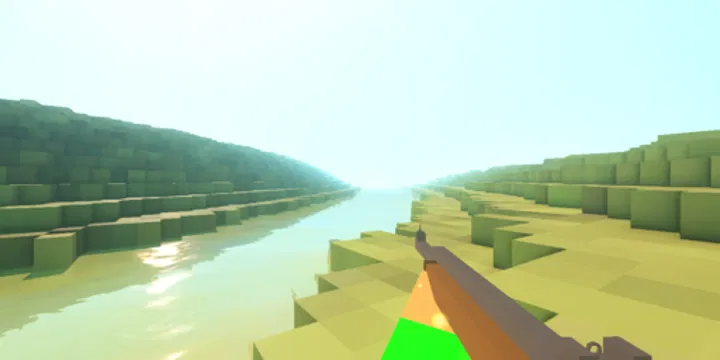
A FOSS minecraft-like team fps

GitHub - zerospades/zerospades: OpenSpades modified to some extent

ZeroSpades is a free and open source fork of Openspades which itself came out of recreating Ace Of Spades in a community project. This is a multiplayer fps game with block building and destruction. It is basically minecraft but with trenches and guns, but it works pretty damn well given how simple the ingredients are. If you remember Ace Of Spades, it has a similar feel obviously. Definitely a fun game to check out, the shooting mechanics are actually pretty fun and the block placement and destruction heavily plays into the team game modes and their objectives. Worth checking out!! some gameplay https://www.youtube.com/watch?v=KxqfQeZRiJk https://www.youtube.com/watch?v=3Hl_wdmig4w https://zerospades.github.io/

github.com

GE-Proton11-14 Released

HOTFIX RELEASE Patch notes in spoiler

github.com

My adventure with GOG and Heroic game launcher

So I wanted to try Heroic Game Launcher, to see how well it works with GOG games. So I bought Tainted grail from GOG at half the price it was at Steam to try it out. 😋 1. Purchasing was of course easy as always, no sweat except it gave me a warning that Tainted Grail isn't compatible with my Linux OS. Installing Heroic Game launcher was also easy because it's in the repositories of my distro. So off to a good start. 👍 2. But then it went a bit sideways, because the game launcher absolutely refused to log into my GOG account, I even tried logging out and in again to check if I was using the correct info. Well that sucked. 3. So I tried the galaxy download/install which would be very convenient if it worked. But apparently it didn't, it kept working on it for an hour, but there was no visible window for the install progress so I ended giving up on that. 4. But luckily GOG is without DRM and we can download the game installation files. So on to that. There were the install files and lots and lots of patches, so I downloaded everything. And when finished I started the installer exe that runs a GOG installer that luckily works in wine. So I fainally got the game installed. 🎉 5. On to launching the game, but for some reason the installer had not made a menu item for the game, so I had to find it in the hidden wine folder under GOG games, so finally GAME LAUNCH!! 😀😀 (Except later I found it had made the menu item, it's just under wine and not under games.) 6. Now it gets exciting ProtonDB state the game to have platinum ranking, so I figured there would be a good chance for it to fine from here. But no, rendering shader were extremely slow, and after 5 minutes it crashed. Goddam that was unexpected. ⁉️ Ok I reboot my system, and try again with the plan of bypassing the pre rendering. The game did that by itself for some reason, and I was presented with an introduction and I could start a new game. 7. But already when being introduced to making my character it was obvious the graphics 3D rendering didn't work at all, lots of missing textures and flickering where the textures should have been. I tried to start the game with my weird character anyway. An was presented with unplayable graphics, and then it crashed. 😭 8. Then I remembered that when I was in Heroic Game Launcher there was an option to add a game. So I figured let's try that. Now that I have a complete installation. So Heroic Game Launcher got another chance, and adding the game was easy peasy, it defaulted to launch with GE Proton 10-34, I'm not even sure I had that installed, and it also made an icon with one of the well known pictures for the game adverts. Wow this is pretty cool. 👍😎 9. Now to see if this works, I have no idea how the game launcher figured out what it did, but I launched the game from the Heroic Game Launcher: Aaaaannnnddd Everything was perfect 🎉 🎉 🎉 Played the game for 4 hours straight before I had to go to bed, no problems detected whatsoever!!! So this is definitely not the last time I buy on GOG, it would be cool if the Heroic Game Launcher could log into GOG, but even without that, it is absolutely stellar. HUGE SUCCESS IMO.