🌉 bridged from @christos@lemmy.world by Tidepool

christos
@christos.lemmy.world.ap.tdpl.io
Sudoku in the terminal, with mouse support (bash)
cross-posted from: https://lemmy.world/post/54813074
tui-sudoku is a configurable terminal interface sudoku game, with quite a few features. https://gitlab.com/christosangel/tui-sudoku Updated version 3.0.0 introduces full mouse support No A.I. was used during the development of this project.
Sudoku in the terminal, with mouse support (bash)
cross-posted from: https://lemmy.world/post/54813074 tui-sudoku is a configurable terminal interface sudoku game, with quite a few features. https://gitlab.com/christosangel/tui-sudoku Updated version 3.0.0 introduces full mouse support No A.I. was used during the development of this project.
Sudoku in the terminal, with mouse support (bash)
tui-sudoku is a configurable terminal interface sudoku game, with quite a few features. https://gitlab.com/christosangel/tui-sudoku Updated version 3.0.0 introduces full mouse support No A.I. was used during the development of this project.
Corsaro: Search torrents in the terminal (Bash)
cross-posted from: https://lemmy.world/post/52083066
https://gitlab.com/christosangel/corsaro corsaro is a script written in Bash that allows the user to search for torrents in the terminal . colors1 The functions and the data are taken from https://piratebay.live/ Opening the script, the user through the main menu, can: • Search for a torrent • Search for a torrent in a category • Search for a torrent in multiple categories • Check out top 100 torrents in a category • Browse torrents in a category • Browse the most recent torrents • Repeat previous torrent search • Browse torrent search history and repeat a search using a stored key word • Configure the parameters of the script
Corsaro: Search torrents in the terminal (Bash)
https://gitlab.com/christosangel/corsaro corsaro is a script written in Bash that allows the user to search for torrents in the terminal . colors1 The functions and the data are taken from https://piratebay.live/ Opening the script, the user through the main menu, can: • Search for a torrent • Search for a torrent in a category • Search for a torrent in multiple categories • Check out top 100 torrents in a category • Browse torrents in a category • Browse the most recent torrents • Repeat previous torrent search • Browse torrent search history and repeat a search using a stored key word • Configure the parameters of the script
Terminal fullscreen dimensions
A simple question with an easy answer: how many characters long is your terminal in full screen? I am working on a torrent searching script, and I am interested in the statistical max dimensions of a terminal. Thanks in advance.
Terminal fullscreen dimensions
A simple question with an easy answer: how many characters long is your terminal in full screen? I am working on a torrent searching script, and I am interested in the statistical max dimensions of a terminal. Thanks in advance.
Terminal Tower of Hanoi, in Bash
cross-posted from: https://lemmy.world/post/47988648
https://gitlab.com/christosangel/hanoi Hanoi is a simple terminal version of the known classical game Tower of Hanoi, written in Bash. During the game, the user can move left and right, pick disks and drop them in other stacks. The aim is to move all the disks from the ORIGIN pile to the DESTINATION pile, in as little moves as possible hanoi.png
Sausage, a terminal word puzzle in Bash, inspired by Bookworm
cross-posted from: https://lemmy.world/post/28754519
https://gitlab.com/christosangel/sausage sausage is a terminal word forming game, written in Bash. This game was inspired by https://en.wikipedia.org/wiki/Bookworm_(video_game). https://gitlab.com/christosangel/sausage/-/raw/main/screenshots/word1.png The aim is to score points by creating words, moving around in six directions in the grid, using consecutive letters. When the user created longer words, coloured letters appear. The user can score more points by using these coloured letters. More points can also be scored, when the user manages to create the bonus words. When smaller words are created, or low point yielding words, red letters appear in the grid. If not used, these red letters will drop one cell in every turn. When a red letter reaches beyond the bottom of the grid, the game is over. The user can also reshuffle the letters in the grid, in order to be able to create words. However, there is a price to this action: the existing red letters will drop one cell, all other bonus coloured letters will be lost, and more red letters will appear. If the score is among the 10 best scores achieved, it makes it in the Top Ten Highscores. https://gitlab.com/christosangel/sausage/-/raw/main/screenshots/stats.png
deshuffle, word puzzle against the clock (Bash)
https://gitlab.com/christosangel/deshuffle deshuffle is a terminal word puzzle game, written in Bash. The simple aim is to put all the given letters in order to find the shuffled word against the clock. The time available after a number of words also reduces, so the game gets harder as it goes. There is not only one solution to every puzzle. If the user find a word with the same letters, the solution will be accepted. By default, the adjusted definitions of the words appear in the end of each round. The game ends when the user fails to find the word in time, or fails to create an acceptable solution altogether. If the score is among the 10 best scores achieved, it makes it in the Top Ten Highscores. This game was inspired by https://wordnerd.co/23words/.
troblo, a simple match-three terminal game (Bash)
cross-posted from: https://lemmy.world/post/26801933 https://gitlab.com/christosangel/troblo troblo is a terminal match-three game, written in Bash. The aim is to place each time a pair of new tiles with fixed orientation on available empty squares of the 6x6 grid, in order to create rows or columns of three or more matching tiles, which will become empty again. The new pair of fixed orientation tiles is shown each time at the right side of the grid. The new pair can be placed only if both selected squares are empty. The game ends when the grid becomes so clogged with unmatching tiles, and there is no place in the grid to drop the new fixed orientation (horizontal or vertical) pair of tiles. This game was inspired by https://368chickens.com/.
xfce, mpv: media title scrolling in the panel.
cross-posted from: https://lemmy.world/post/21801277
https://gitlab.com/christosangel/genmon-mpv This project is created for use with the xfce desktop environment, and the mpv media player. With the use of the Generic Monitor panel plugin, it displays scrolling the name of the file or the stream playing with mpv. If another instance of mpv starts playing, genmon-mpv will display the most recently opened title of file/stream. As soon as an mpv instance displayed is closed, and another previous instance is still open, genmon-mpv will display the title of the still open file/stream. This project is consisted of two scripts, one in bash, and one in lua. Any feedback is most welcome.
gitlab.com
xfce, mpv: media title scrolling in the panel.
cross-posted from: https://lemmy.world/post/21801277
https://gitlab.com/christosangel/genmon-mpv This project is created for use with the xfce desktop environment, and the mpv media player. With the use of the Generic Monitor panel plugin, it displays scrolling the name of the file or the stream playing with mpv. If another instance of mpv starts playing, genmon-mpv will display the most recently opened title of file/stream. As soon as an mpv instance displayed is closed, and another previous instance is still open, genmon-mpv will display the title of the still open file/stream. This project is consisted of two scripts, one in bash, and one in lua. Any feedback is most welcome.
Pyradion, internet radio TUI client, with recording functionality, written in Python
cross-posted from: https://lemmy.world/post/8393990
https://gitlab.com/christosangel/pyradion Through the menus, the user can : • Select directly a station from the Favorites list (which is configurable). • Select a random station out of this list of Favorite stations. • Select a tag to pick a station from. • Select to pick a station from All Stations. • Select a random station out of this list of #tag stations. • ❌ Quit pyradion. ———
Recording
Recording a radio stream in pyradion can be done easily, just by hitting r or R. record.png The user will be notified through the status line of the recording taking place, and of the output file name. Editing the
pyradion.configfile, the user will be able to define output audio file directory. If the title is available by the stream, the file will take its name by it. If title isNot Available, the file will take a date/time for name.Output File Format
In order for recording to work for mpv, output file format must be the same with stream format. Therefore stream format is recognised, and passed to the output file (e.g. mp3, ogg, aac). ——— This project shares more or less the same logic with a previous project in
Bash: https://gitlab.com/christosangel/radion although with this Python script some more features are available. ———Radion, an internet radio CLI client, written in Bash.
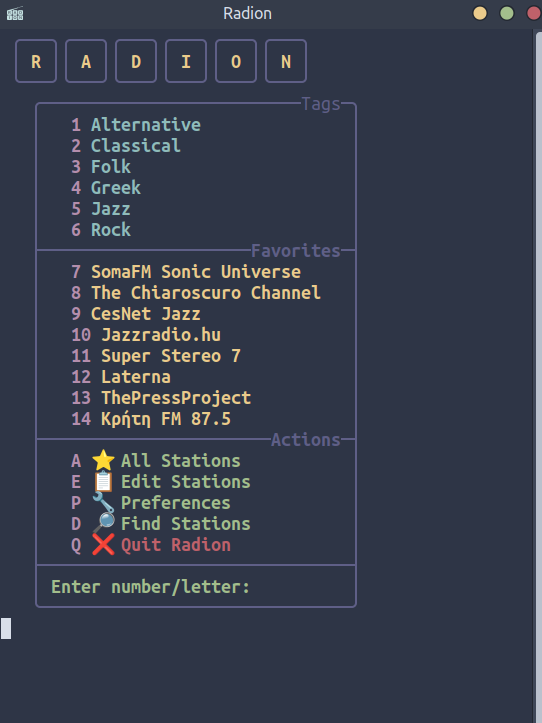
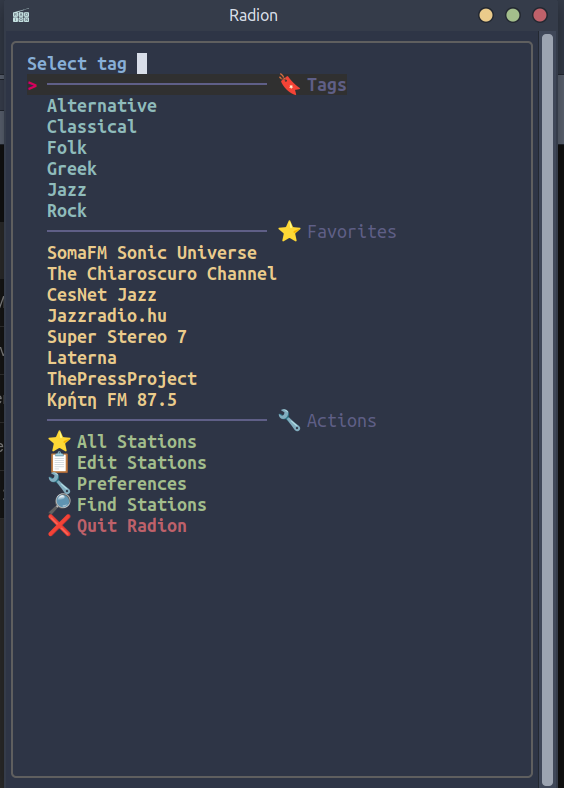
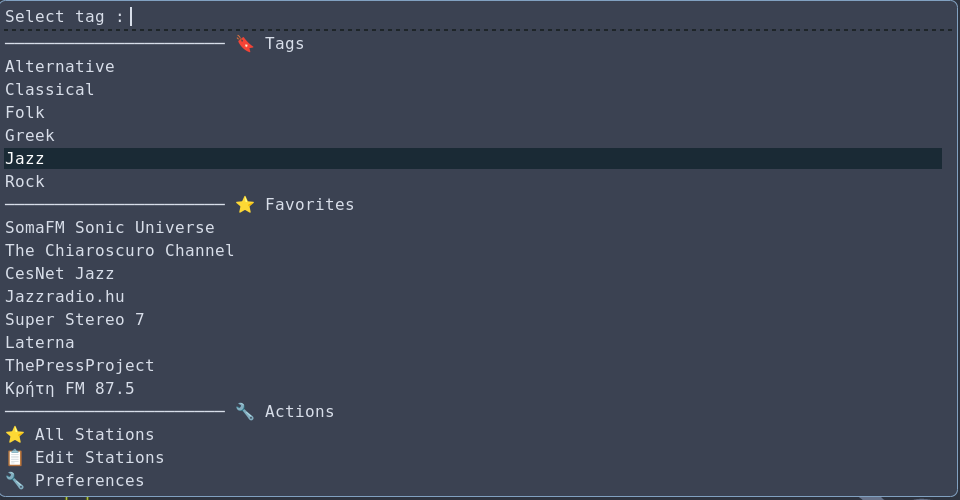
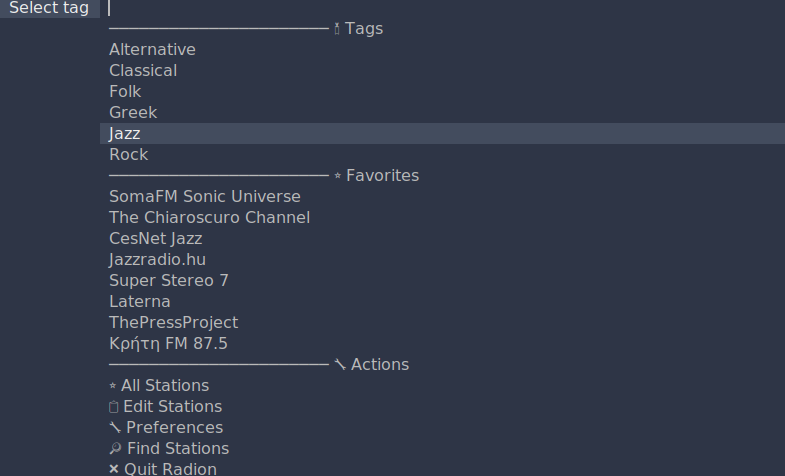
cross-posted from: https://lemmy.world/post/7130971 cross-posted from: https://lemmy.world/post/7130937 radion is an internet radio CLI client, written in Bash. https://gitlab.com/christosangel/radion Radion can be costumized as far as the station selecting program is concerned. The user can choose between: • read read • fzf fzf • rofi rofi • dmenu dmenu ——— Update: Introduced new feature: costumizing prompt text for fzf dmenu and rofi. ——— Update: Recording functionality added, with the use of another (you guessed it) bash script icy Also options in
readas Preferred selector are also case insensitive. Any feedback is appreciated!Simple nord wallpaper
And another one: image
Weather forecast panel applet for xfce & cinnamon
cross-posted from: https://lemmy.world/post/640184
A weather applet for Linux Mint OS in bash. Detects the Desktop Environment (Cinnamon or Xfce), and shows the weather in the panel. Also shows tooltip with meteorological info on hover. Finally shows 3 day weather forecast on click. https://gitlab.com/christosangel/weather_forecast_xfce_cinnamon The source of the data that are presented: https://wttr.in/ https://github.com/chubin/wttr.in