A community for everything relating to the GNU/Linux operating system (except the memes!)
Also, check out:
Original icon base courtesy of lewing@isc.tamu.edu and The GIMP
🌉 bridged from !linux@programming.dev by Tidepool

A community for everything relating to the GNU/Linux operating system (except the memes!)
Also, check out:
Original icon base courtesy of lewing@isc.tamu.edu and The GIMP
🌉 bridged from !linux@programming.dev by Tidepool
Ubuntu's AI launcher, Torvalds vs AI patches, and Pop!_OS 26.04 - Linux Weekly News
Timestamps: 00:00 Intro 00:29 Sponsor: InterNXT 02:22 Ubuntu's Al plans 05:06 Ubuntu Core Desktop targets 2028 07:53 Linus Torvalds is angry at Al powered stuff 09:59 XNU Linux Lets macOS Userspace Processes Run On Linux 12:07 LibreOffice implements a more restrictive Al policy 14:31 CachyOS implements EACv2 compatible kernel 16:40 Pop!_OS 26.04 LTS released with COSMIC theme updates 18:26 LibreOffice reports good health 20:47 Valve says it might have to raise the price of Steam Machines 22:33 Heroic is becoming the all in one game launcher 24:38 Sponsor: Tuxedo Computers Links: Ubuntu's Al plans https://www.omgubuntu.co.uk/2026/11/ubuntu-ai-launcher-details https://discourse.ubuntu.com/t/beyond-a-launcher-a-new-way-to-interact-with-ubuntu/92365?u=d0od Ubuntu Core Desktop targets 2028 https://www.theregister.com/os-platforms/2026/11/20/ubuntu-core-desktop-targets-2804-debut-with-default-status-in-its-sights/5310837 Linus Torvalds is angry at Al powered stuff https://www.phoronix.com/news/Linus-Torvalds-EXT4-AI-Big XNU Linux Lets macOS Userspace Processes Run On Linux https://www.phoronix.com/news/XNU-Linux LibreOffice implements a more restrictive Al policy https://blog.documentfoundation.org/blog/2026/11/24/updated-and-more-restrictive-policy-for-llm-usage-in-libreoffice-development/ CachyOS implements EACv2 compatible kernel https://feed.itsfoss.com/link/24361/17538226/cachyos-november-release Pop!_OS 26.04 LTS released with COSMIC theme updates https://www.omgubuntu.co.uk/2026/11/pop_os-26-04-lts-released https://system76.com/blog/post/pop_os-26-04-lts-has-landed LibreOffice reports good health https://linuxiac.com/libreoffice-downloads-hit-an-all-time-high-in-2025/ https://blog.documentfoundation.org/blog/2026/11/25/the-document-foundations-annual-report-2025/ Valve says it might have to raise the price of Steam Machines https://arstechnica.com/gaming/2026/11/valve-says-it-might-have-to-raise-the-price-of-supply-limited-steam-machines/ Heroic is becoming the all in one game launcher https://www.gamingonlinux.com/2026/11/heroic-3-0-0-beta-1-brings-steam-and-itch-io-integration-a-new-ui-and-much-more/

Ubuntu details plans to ‘replace’ its app grid with an AI smart launcher at OMG Ubuntu updated on 26 Nov 2026
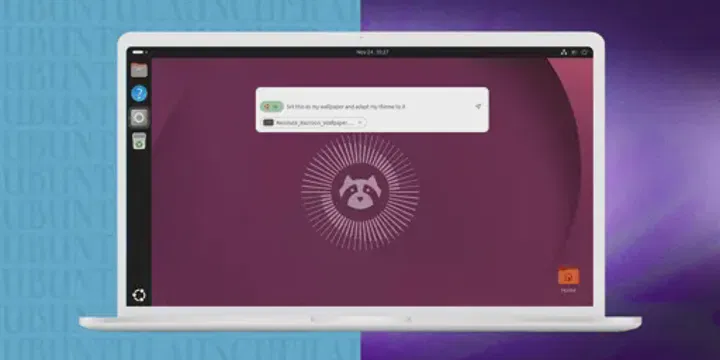
Article content: ——— Canonical has shared more detail on plans for an AI-powered Ubuntu launcher, which it hopes will offer users “a new way to interact” with the desktop. In a post on Ubuntu Discourse, Canonical desktop engineer Didier Roche says the goal is to create a unified ‘entry point’ that lets users open apps and find files, but also access AI features when they explicitly want it. This will go beyond providing an alternative to the app grid, allowing for ‘prompt’ style workflows that use privacy-friendly AI models that run locally. It will support text and voice input, the latter likely making use of the distro’s voice-to-text tool Myna. “Over the past few months, we’ve been discussing how intelligence and modern workflows should fit into Ubuntu”, Didier Roche writes, adding that the new launcher is being build with 4 ‘non-negotiable’ principles in mind: consent, privacy, security and local-first. As such, any AI integration in the new launcher will be opt-in and only triggered when explicitly requested. Anyone uninterested in typing out tasks could use the launcher traditionally, free of any Clippy-esque ‘it looks like you’re trying to…’ nags. Prototype to potential A video of the prototype from October We got our first look at the launcher in October 2026, when Roche uploaded a semi-interactive prototype to the Snap store. As I noted in my original article, this ran through simulations of the kind of things it could, if real, do. The most impressive of the warty-prototype snap’s faux-tasks was one where it was asked to create a calendar itinerary from selected items in the system clipboard history that could be immediately added to the Calendar app. (IMO, a more compelling use-case for saving time, than just appearing to with things like “change my wallpaper to this file”, which to my mind requires more effort to type and more cycles to execute than a simple right-click > set as background would). Simulations can be perfect. Making them real, working code is harder – but it’s coming. Canonical says it’ll share more detail on its new launcher’s architecture in January, alongside an installation version that it wants users to install, break and provide feedback on – feedback, it adds, will shape the overall vision. There’s nothing to try yet, but lots to think about – what would get you using this over your current app menu? Let me know in the comments.
Linux Mint 27 Beta Now Available With Ubuntu 26.04 LTS Base
Linux Mint 27 “Adrien” has reached beta, with ISO images for all three editions (Cinnamon, Xfce, and MATE) now publicly available for download, and the final stable release is expected around Christmas. Based on Ubuntu 26.04 LTS and powered by Linux kernel 7.0, the release introduces Cinnamon 6.8, a new system installer, several homegrown desktop applications, and major system administration improvements. On the desktop side, Cinnamon 6.8 introduces one-to-one touchpad gestures under both X11 and Wayland, allowing animations to follow finger movements directly. It also supports individual wallpapers on each monitor, improved application search, and better window focus management. Importantly, Cinnamon’s Wayland session is no longer classified as experimental. Extensive work has gone into improving window positioning, multi-monitor configurations, HiDPI rendering, XWayland compatibility, and input handling. However, X11 remains the default session. The Nemo file manager receives several improvements, including a new preview pane accessible via the F7 key, providing previews of images, audio, and video files alongside their metadata. Directory navigation is faster, and interactive search now filters the contents of the current folder as users type. Cinnamon also gains its own screenshot utility, delivering improved Wayland compatibility, individual monitor selection, window captures with or without shadows, and cropping before saving. Another major change in Linux Mint 27 is the introduction of several new applications developed within the XApp project. These include Superlight, a comprehensive system monitor; Velocitty, a terminal emulator; Unfold, an archive manager; Xepub, an electronic book reader; and Clockenstein, a calendar application with a dedicated alarm clock utility called Clocks. Superlight provides detailed information on CPU, memory, GPU, network, and storage activity, while Velocitty offers tab previews, configurable color schemes, and saved SSH sessions. Clockenstein supports local calendars, Google Calendar, and CalDAV services, including Nextcloud. Under the hood, Linux Mint 27 replaces Ubuntu’s Ubiquity installer with its own Live Installer, previously used in Linux Mint Debian Edition. The current beta lacks an automatic installation option alongside an existing operating system and requires manual partitioning for dual-boot setups. Hibernation also makes a comeback through a new Sleep Modes section in System Administration, letting users configure hibernation, hybrid sleep, and suspend-then-hibernate directly from the graphical interface. Moreover, Linux kernel management has been moved from Update Manager to System Administration, introducing more flexible controls over kernel series, automatic cleanup, protection of selected kernels from removal, and support for managing alternative kernel series. Finally, Linux Mint 27 marks the beginning of the distribution’s new annual release cycle, replacing the previous model of incremental point releases. The change also explains the jump in version numbering from Linux Mint 22.3 to 27, with future releases following a calendar-based naming scheme. Those interested in testing Linux Mint 27 “Adrien” Beta can download the Cinnamon, Xfce, and MATE installation images from the project’s official testing server, where SHA256 checksums and GPG signatures are also available. Keep in mind that this is a pre-release version intended for testing, not production use. For more details, see Mint’s official announcement.

Linux Dropping Last Of The 1980's VersaModular Eurocard "VME" vme_user Code Over AI/LLM Noise
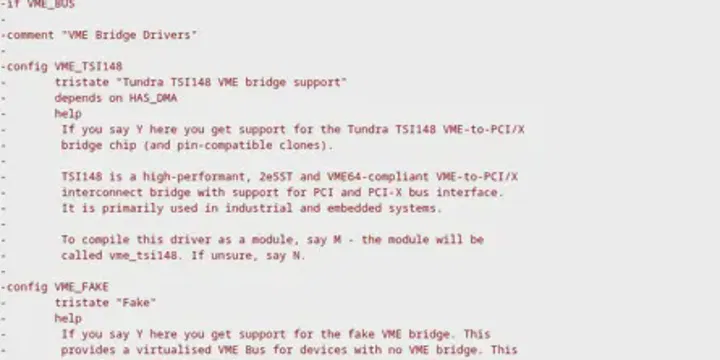
The Linux kernel is removing more old driver code due to AI/LLMs generating more noise over this unused, obsolete code within the source tree. Following various old ISA and PCMCIA code removed, ham radio, ISDN, and other old network code, the latest vintage artifact set to be stripped out of the Linux kernel is around the VersaModular Eurocard "VME" bus vme_user driver from the 1980s. The Linux kernel ahead of tomorrow's Linux 7.4-rc5 release has seen a post-merge-window pull request for removing the last of the VersaModular Eurocard "VME" parallel computer bus code's vme_user driver for user-space access. The "vme_user" driver that for years has been within the Linux kernel's staging area -- the VME code was demoted to staging in 2022. There is no other kernel code left in the tree that is dependent upon the vme_user driver and with it not being maintained and for obsolete hardware, it's time to drop it given that it's been causing AI/LLM noise on the mailing lists. The patch removing it drops nearly 9k lines of code. The rationale on the removal patch:
"The staging VME userspace drivers are orphaned and Greg KH requested a patch to remove them instead of continuing to fix staging-only issues.

Remove the driver, its documentation, Kconfig and Makefile entries, the VME MAINTAINERS section, and stale VME options from the powerpc 86xx config."
In today's staging pull, Greg Kroah-Hartman confirmed the AI/LLM noise:
"Here is a single staging driver patch that removes the vme_user driver. There is no more users of it and the LLMs are falling all over themselves attempting to find all of the "security bugs" in this driver, despite no one ever actually use it. So just remove it to keep from wasting everyone's time.

This removal has been in linux-next for quite a while with no reported issues."
So barring any last minute issues, the vme_user code will be removed ahead of tomorrow's Linux 7.4-rc5 kernel release.
Running per-app VPNs while the rest of the system runs on one?
I'm new to configuring wireguard & VPNs on Linux, I asked claude for a lot of input and am wondering if there are any faults in what I came up with or if there are better practices or things to do.
• I'm using NetworkManager with iwd for connecting to wifi, since KDE's wifi menu supports it.
• I have ProtonVPN Plus, for the whole system it works with either the app or with a wireguard configuration imported into KDE. For this I just tested with the former.
• For per-app connections claude suggested vopono, I set up the systemd unit for it as recommended in the docs. I use commands like this: vopono exec --custom wireguard-config.conf -i eth0 --protocol wireguard browser-name.
• However it looks like every time I start my PC up I need to do this command (provided by claude) to fix priority: sudo ip rule add from 10.200.0.0/1 lookup main priority 100 (I could have it run automatically on startup or add it to my nix config, but am wondering if something like is normal for this).
• I mainly want to have different IP addresses in different browsers.
Right now this is my NixOS configuration:
  networking = {
    hostName = "my-pc-host-name";
    networkmanager.enable = true;
    networkmanager.wifi.backend = "iwd";
    firewall.checkReversePath = false;
    wireless.iwd = {
      enable = true;
      settings.General.EnableNetworkConfiguration = true;
    };
    networkmanager.unmanaged = [
      "interface-name:vo_*"
    ];
};systemd 263-rc1 Ships Initial Rust Code, Experimental Pseudo TTY Broker & Manifest
Systemd 263-rc1 was just tagged in gearing up for this next major release. Systemd 263 brings initial support for using the Rust programming language for creating new Rust programs. Plus systemd 263 ships with a new pseudo TTY broker service, a manifest tool, a new keyring service and much more. Some of the highlights of systemd 263 include: • As previously covered, systemd now has support for Rust programs. Rust code is now available in the systemd leaf code but not in the systemd core library code yet. The intent is also on Rust being used for new development and not rewriting existing C code in Rust just for the sake of it. • A new experimental pseudo TTY broker. The systemd-ptybrokerd service allows pseudo TTYs and keeps them open independently of the client that requested it. This, for example, can be used to disconnect from a container console and reconnect later on without stopping the container. • A new systemd-manifest tool to generate and verify file manifests for directory trees. The default format is the UAPI.16 File Manifest. • A new systemd-keyring-setup.service to enroll X.509 certificates into the kernel's dm-verity, fs-verity, and BPF keyrings early during boot followed by sealing the keyrings. • Reading and verifying of large systemd journals is now faster -- can be about 1.7x faster for the default journalctl output. • The systemd-networkd and networkctl have been merged into a single multi-call binary for a smaller installation footprint. • systemd-resolved can now verify ML-DSA-44 DNSSEC signatures. • A new SecureBits= setting for system.conf and user.conf to set secure bits on the service manager itself. • A new unit setting of IOuringFilter= to set an allow list or deny list of IO_uring operations. • systemd-report has new metric providers for reporting hardware temperatures, free space on writable file systems, SMART information, and NVMe disk health details. More details on the plethora of systemd changes and new additions coming to systemd 263 can be found via today's 263-rc1 announcement.
Pop!_OS 26.04 is out: is the Cosmic desktop ready now?
Timestamps: 00:00 Intro 00:41 Fresh start 02:16 Theming: looking good! 06:24 Sponsor: Hostinger 07:41 New Apps 10:37 Community support 14:48 Other Changes 22:57 Ubuntu base 24:58 Still a first draft? 27:59 Sponsor: Tuxedo Computers

Gliver completes the Guix desktop -- Dustycloud Brainstorms
There's a bit of irony in the title. At the time of writing, Gliver, a Guile based window manager for Wayland in the style of StumpWM and Emacs, isn't yet in Guix. There is, however, an open PR to add Gliver to Guix. However, what that patch is really waiting on is an upcoming release of Gliver which will solve many bugs. Notably, that release will be 0.0.5. If that sounds early, Gliver still is early. There are bugs, and you will probably have to file issues for some that you discover. There are also some noticeable missing features. But it doesn't matter. Gliver is everything I want from a desktop experience, and I suspect for many of the kinds of people who read my blog, it will be for them as well. Gliver might not be for everyone. But if the following appeals to you: a live-hackable, written in Guile Scheme, tiling window manager which looks good, feels good, and whose codebase is understandable and, indeed, encourages you to understand and explore it, Gliver is for you.
StumpWM was what I ended up after over 30 years with as my preferred Window manager, and what suits me best. It is extremely fast for software development because with its manual tiling, you can pair docs, browser, command line, editor and config side by side and switch with one key press. It is written in Common Lisp, has Emacs-like key chords, and is entirely programmable (for example you can bind a key to a function that copies the URL of the current browser window, invokes Emacs, and pastes that URL into a "bookmarks.org" file). A window manager like this, written in Guile, running under Wayland, is a dream coming true.
Weird issue with Fedora and IVPN no internet
I'm posting this here for people having the same issue, it is solved already.
The status in the APP would show connected but have no internet. Some things would load in Firefox like google search but not DDG for instance. I contacted support and went through some data on my pc and I ended up just reinstalling Fedora to see if there was some configuration issue left over from my previous VPN provider. I found that turning on Obfuscation fixed the issue but made the connection very slow. Support suggested turning down the MTU setting. I went down to 1280 which fixed the issue.
Sudoku in the terminal, with mouse support (bash)
cross-posted from: https://lemmy.world/post/54813074
tui-sudoku is a configurable terminal interface sudoku game, with quite a few features. https://gitlab.com/christosangel/tui-sudoku Updated version 3.0.0 introduces full mouse support No A.I. was used during the development of this project.
CachyOS Just Made One of Linux’s Biggest Gaming Problems Way Easier
CachyOS is a distro pick that suits both power users and gamers alike. The installer offers 17+ desktop environments to pick from, and gamers get a Handheld Edition for devices like the Steam Deck and ROG Ally. Based on Arch Linux, it ships its own kernel and package builds for specific CPUs, while the installer comes as a GUI or a command-line version. CachyOS has now put out its sixth release of the year, and this one changes how the system boots, recovers, and installs software. The November Release CachyOS now has a dedicated kernel for games that use Epic's Easy Anti-Cheat (EAC) Linux v2. EAC checks the boot chain before it lets a game run, and the new linux-cachyos-eac kernel is signed with the CachyOS key. Don't worry, it gets a dedicated boot entry, while your regular ones stay untouched, with the eac-setup script handling the bootloader configuration. Because DKMS modules don't load on this kernel, NVIDIA, ZFS and r8125 come as prebuilt packages for it. Then there's cachyos-recovery, a rescue image that lives on the EFI partition and can be launched from the bootloader menu or directly from UEFI without a live USB. From its menu, you can boot any Btrfs snapshot with a writable root to check it first and roll back once you're happy with it. The rollback also runs from a desktop notification. It works without Snapper and supports LUKS-encrypted disks. The package is cachyos-recovery, with a cachyos-recovery-legacy variant specifically for BIOS machines. Similarly, Package Installer, the software manager, reaches v2.0 with a new UI. It can now handle AUR, Flatpak and AppImage packages, and each one is opt-in. Before an AUR build runs, you can read the PKGBUILD and install scripts, and a static analysis step highlights what deserves a closer look. Updates come with a diff against the installed version. CachyOS Settings, the package holding CachyOS's tuning configs, brings backsystemd-oomd, the out-of-memory killer, and enables it by default. It steps in based on swap usage and skips the user session. The new cachyos-drm-awaiter helper replaces early KMS and the nvidia-module-loader. Early KMS used to initialize the graphics driver during the boot process, allowing CachyOS to switch to the display's native resolution much earlier. Now, the helper holds the login screen back until the graphics driver has loaded, and that applies to any driver rather than only NVIDIA's. If loading fails, a QR code shows up on screen. chwd, the hardware detection tool, drops early KMS to match, and existing users need to run sudo sudo chwd -a -f after updating to apply the change. Calamares (the GUI installer) uses the CLI installer's gucc library for the initramfs, machine-id, and post-install steps, and the rest is being moved over step by step. The CLI installer itself was refactored onto the same library. Plymouth, the boot splash, is now optional, and the rEFInd + AI SDK bootloader option is gone. CachyOS can also run on the Windows Subsystem for Linux now through a new image. And finally, the kernel moves to Linux 7.3.5, with NVIDIA 620.73.04 and Mesa 26.3.1 also being included. The full changelog is available in the release blog post. Download CachyOS The Desktop Edition ISOs have been updated to reflect the changes in this new release. If you are looking to try it for the first time, then this is the pick for you. Existing users can upgrade to this release by running the following command:
sudo pacman -Syu

I made usb-rea: point it at a USB capture of a Windows-only vendor app and it writes a Linux driver
A lot of small hardware (AIO cooler screens, RGB hubs, stream decks, case LCDs) only ships a Windows app, and the usual route to Linux support is someone staring at Wireshark for an evening. I built usb-rea to do the step after Wireshark.
You capture with usbmon on Linux or USBPcap on Windows, label what you clicked in the vendor app (brightness 0, 50, 100, fan 30%, and so on), and it infers the command layout: constant headers, which byte follows which setting, counters, checksums like CRC16, lookup tables and image streams. It then writes a Markdown report where every claim points to Wireshark frame numbers, plus a standalone pyusb driver.
On public captures of the NZXT Kraken X it recovers the fan command byte for byte as liquidctl sends it, and the generated driver produces identical packets for values it never saw. It is alpha, MIT, pip install usb-rea, and usb-rea demo --device fan runs without any hardware.
If you have a device that only works on Windows, I am happy to run a capture through it and post the result.
MNT Reform Next looks awesome, and started shipping this month!
If you didn't know, MNT is a bit like Framework, but they truly embrace the open hardware ethos and make some awesome looking computers. Their devices ship with Debian out of the box and are manufactured in Germany 🇩🇪. The original MNT Reform shipped with a Rockchip RK3588, a mechanical keyboard, a trackball, replaceable 18650 LiFePO4 battery cells, a 12.5" 1080p display, and a chunky aluminium body. They later released the Pocket Reform, which was very cute with an ortholinear keyboard and a 7" display. The new MNT Reform Next has a slimmer design compared with the original, while keeping the mechanical keyboard, eight 18650 battery cells, and the 12.5" display. It uses a glass trackpad instead of a trackball (which supports multitouch gestures!), with mechanical left/middle/right click buttons. It looks like an awesome device for the right kind of person, and like their other computers, and firmware is all open-source and the design is open too! Crowdsupply link: https://www.crowdsupply.com/mnt/mnt-reform-next
 View on programming.dev